
·Published by Syed Abdullah Shah·15 min read
How to view instagram stories anonymously Without an Account (2026 Guide)
Instagram records every story view — and the account owner sees your name instantly. You open the app, tap a story, and there you are in their viewer list. It's a small thing, but it comes with fricti
Instagram records every story view — and the account owner sees your name instantly. You open the app, tap a story, and there you are in their viewer list. It's a small thing, but it comes with friction. What if they notice you watching? What if you're checking someone you don't want to interact with? What if you don't have an Instagram account at all?
You're not alone in this. Over 500 million people view Instagram Stories every single day. Most of them want some level of privacy, but Instagram's design makes that impossible if you use your account. The platform doesn't give you an option to opt out of the viewer list. Your name goes there whether you like it or not.
This guide walks you through three methods to watch stories without appearing anywhere. None require you to log in. None require an Instagram account. And all of them work in 2026, despite Instagram's attempts to block them. You'll learn how each method works, when to use it, and what its limitations actually are — not the exaggerated claims you see online.
By the end, you'll know exactly which approach fits your situation.
Why Instagram Shows You in the Viewer List (And Why It Matters)
Instagram's viewer list exists for one reason: engagement tracking. Every time someone views a story, Instagram logs it server-side. The account owner can swipe up on an active story and see exactly who watched, in order of viewing time.
This data persists even after the story disappears. Stories vanish after 24 hours, but the record of who saw them stays longer.
Why does Instagram do this?
Engagement is currency on the platform. If you can see who watches your stories, you feel more connected to your audience. You might reply to viewers. You might follow them back. The visibility creates what Instagram sees as a positive feedback loop. But from the viewer's side, it creates something else: social pressure.
The reasons people want to watch anonymously are practical, not nefarious. Checking in on an ex without them knowing. Monitoring what a competitor is doing. Following a public figure's content without appearing on their list.
Viewing someone's story when you're not really connected but curious. None of these are violations. They're just normal social behavior that Instagram's visibility system has made awkward.
Then there's the account problem. Millions of people don't have Instagram accounts. Some don't want one. Others lost access to old accounts. These people are locked out of story viewing entirely under normal circumstances. Anonymous tools solve this overnight.
The frustration is real, which is why millions search for solutions monthly. And they exist.
Method 1 — Using an Anonymous Story Viewer (Fastest, No Download)
This is the simplest approach, and it's the fastest. Anonymous story viewers are web-based tools that pull public Instagram content for you without you ever logging in. They work because they access Instagram's data through a different route than the app does.
How the Tool Works?
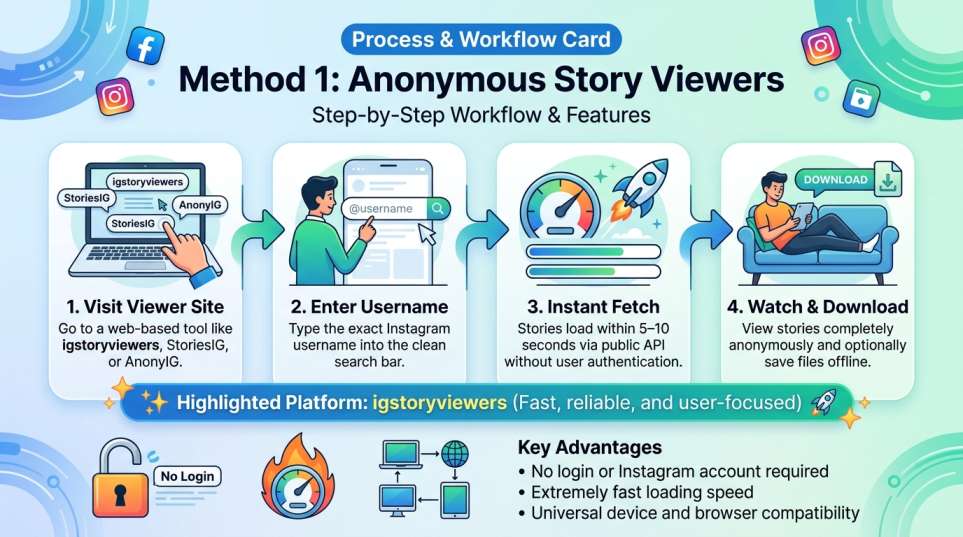
Here's how it works in practice. Visit a tool like igstoryviewers, StoriesIG or AnonyIG. You land on a clean page with a search bar. Enter the username of the person whose story you want to watch. Hit enter. Within seconds, their available stories load on your screen. You click, watch, and optionally download. That's it.
Why does this work? These tools interact with Instagram's public API in a way that doesn't trigger the "viewer" registration. When you use Instagram normally, you authenticate with your account first. Instagram knows it's you, logs the view, and adds your name to the list.
When you use an anonymous viewer, the tool fetches the story data without that authentication step. From Instagram's perspective, no specific person viewed the story. From the account owner's perspective, they'll never see you in their viewer list.
Speed Advantage
The speed is a real advantage. Most tools load a story in under 10 seconds from the moment you enter a username. StoriesIG consistently performs fastest, often in 5–8 seconds. That matters if you're checking multiple stories or just want a quick peek. No waiting, no lag, no frustration.
Public Accounts Only
One limitation worth understanding: these tools only work on public accounts. If an account is private, and you don't follow them, the tool can't pull their stories. Instagram's privacy controls are enforced at the API level, so no workaround bypasses them. If someone has their account set to private, this method doesn't work.
Download & Storage:
Download functionality is an extra feature. Most tools let you save the story to your device if you want to. This is useful if you're gathering content examples or keeping a reference.
The file saves as an MP4 or image file, usable offline. Some tools limit download speed or cap daily downloads. Check the tool's limits before relying on batch downloads.
Device Compatibility
These tools work on any device with a web browser. Phone, tablet, desktop, doesn't matter. Mobile browsers load them fine. There's no app to install, no software to run. Just open the website, search, and watch.
Method 2 — Airplane Mode Trick (No Tool Needed)
This method requires only the Instagram app itself. No external tools, no websites, no downloads. It's popular because it feels like cheating the system with nothing but your phone's built-in settings.
The Technique
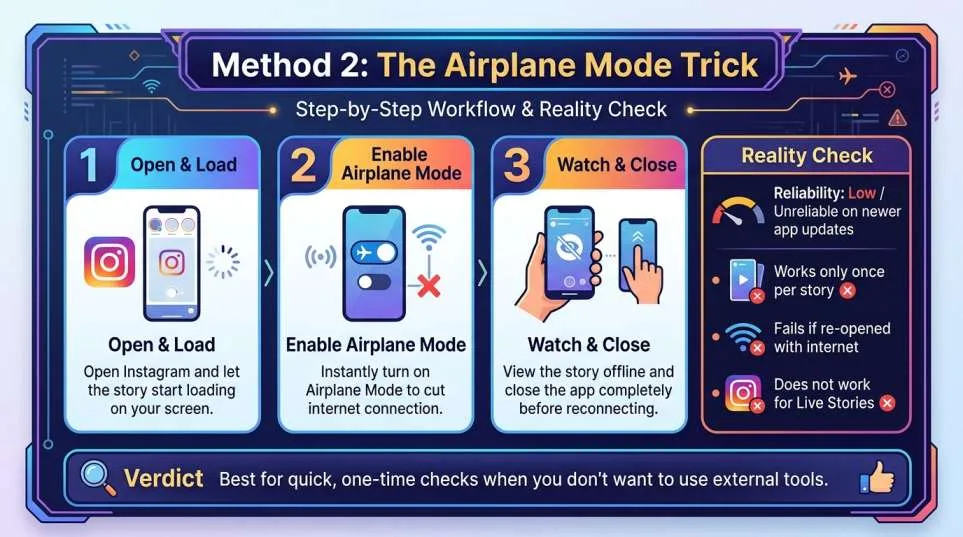
Open Instagram normally and find the story you want to watch. Tap it to start loading. The moment the story appears on your screen, enable Airplane Mode.
This disconnects your phone from the internet before Instagram can send the "viewed" signal back to its servers. You've seen the story, but Instagram never receives confirmation of it.
Why It Works (In Theory)
Instagram registers views in two stages. First, your phone downloads the story media. Second, it sends a "viewed" notification back to Instagram's servers, which then adds your name to the viewer list. Airplane Mode interrupts that second step. Your view never gets recorded.
Why It Doesn't Always Work (The Reality)
Here's the catch: it doesn't always work. Instagram has updated its app multiple times to close this gap. Some versions cache views and send them later when connection is restored, which defeats the purpose.
On newer versions of Instagram, the trick is unreliable. It might work once, then fail the next time. It depends on your phone's OS, your Instagram app version, and whether Instagram's latest update has already patched it.
This method also has a practical problem: you can only use it once per story. Once you've viewed it without internet, opening it again (with internet) will register the view normally. So if you want to rewatch the story later, you'll appear in the list. It's not a permanent invisibility solution.
The Live Story Problem
Live stories make this even trickier. Live stories don't load in advance. Turning on Airplane Mode before a live story is even available won't help you. This method is really only viable for regular Stories, not Live Stories.
When This Method Makes Sense
If you don't want to visit an external website and you're watching a story once, right now, this can work. If you're checking a single story from someone and will never need to watch it again, this works. Beyond that, it's unreliable enough that it shouldn't be your go-to.
Method 3 — Browser Extensions (Desktop-Focused)
Browser extensions are small programs that live inside your browser and modify how websites behave. For Instagram story viewing, an extension integrates directly into Instagram.com, adding an anonymous viewing feature without requiring you to leave the site.
Finding & Installing
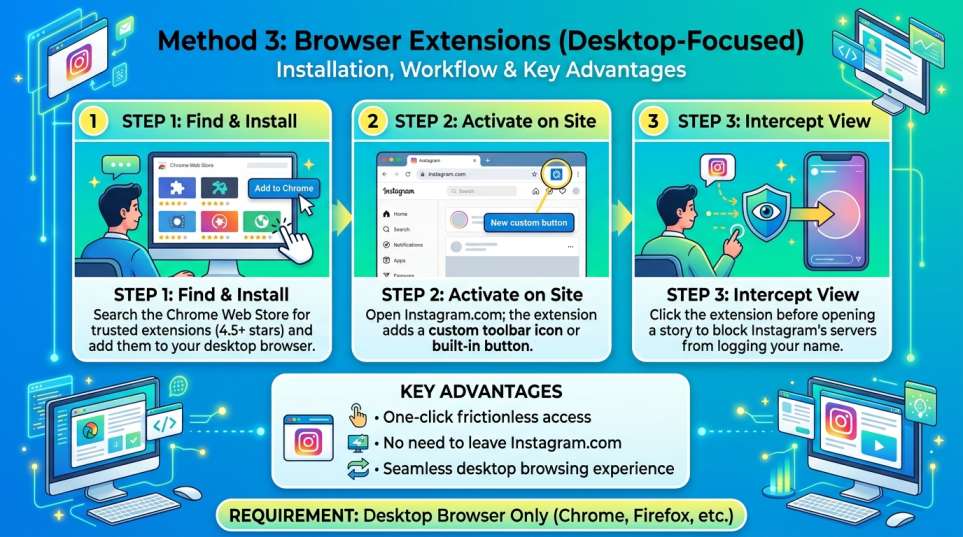
To find one, head to the Chrome Web Store (or your browser's equivalent extension marketplace). Search for "Instagram story viewer." You'll see dozens of results.
Look for extensions with high ratings (4.5 stars or higher), thousands of users (at least a few thousand reviews), and recent updates. Developer credibility matters here.
Once you find one, click "Add to Chrome" (or whatever your browser says) and grant the necessary permissions. Most extensions ask for permission to access Instagram, which makes sense given how they work. After installation, the extension usually adds a small icon to your browser toolbar.
How It Works
Now, when you're on Instagram.com, the extension adds a button or feature you wouldn't normally see. Click it before viewing a story, and it intercepts the view before Instagram's servers register it. You see the story, but your account doesn't appear in the viewer list.
Advantages
The advantage is convenience. Once installed, it's one click. No leaving Instagram, no visiting a separate site. You stay inside the Instagram experience. For desktop users who browse Instagram regularly, this is frictionless.
Trade-offs
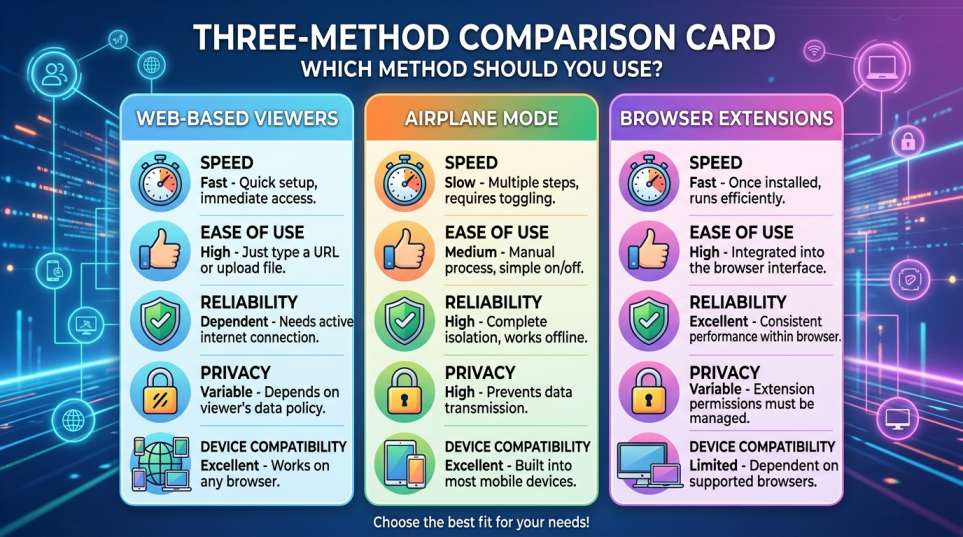
There are real trade-offs to consider. First, the extension requires installation, which means trusting a third-party developer. Some extensions are ad-supported, cluttering your browser with banners. Others have vague privacy policies. Always read reviews and check what data the extension collects before installing. Bad extensions are uncommon, but they exist.
Second, extensions are fragile. When Instagram updates its interface or API, extensions often break. You might install an extension, use it twice, and then have it stop working when Instagram pushes an update. The good extensions are maintained regularly and update quickly when breaks happen. Abandoned extensions become useless within weeks.
Third, extensions only work on desktop. They're not available on mobile browsers or in the Instagram app. If you're primarily an app user, this method won't help you.
When to Use It
If you spend time on Instagram in a browser, and you want the fastest anonymous viewing option, install a well-reviewed, actively maintained extension and you're done.
What These Methods Can't Do (And Why)
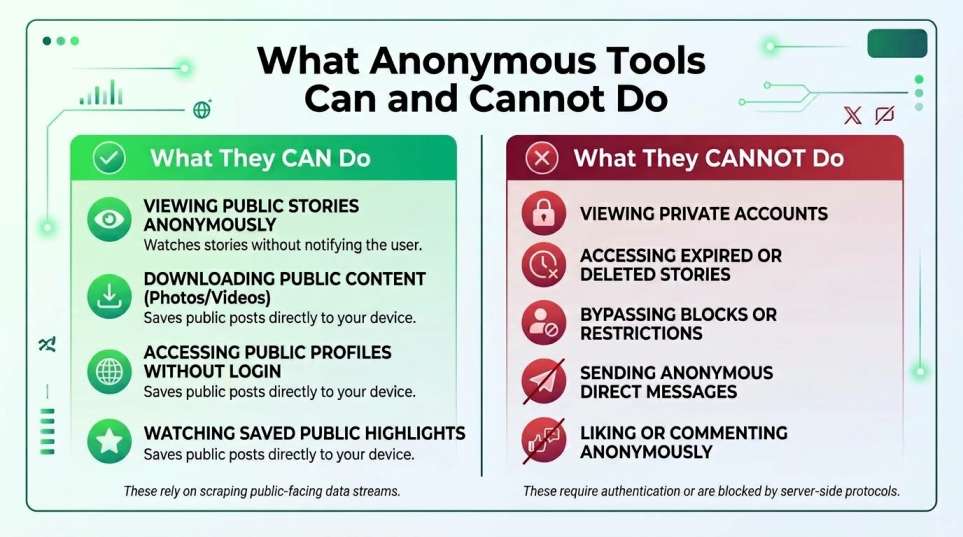
Understanding the limits is just as important as knowing how these methods work. There are some things no tool can do, no matter what marketing claims say.
Private Accounts Are Off-Limits
Private accounts are a hard stop. If someone has their account set to private, and you don't follow them, no tool can pull their stories. This isn't a weakness of these tools. It's Instagram's privacy architecture.
The API simply doesn't return data for private accounts that haven't approved you. It's enforced at the server level. No workaround exists.
Expired Stories Are Gone for Good
Expired stories are gone. Once 24 hours pass, a story disappears. No tool can retrieve it. Stories are designed to be ephemeral. Instagram deletes the content, and it's not coming back.
Some tools claim to access archived stories from specific accounts, but this only works if the account owner has manually saved them to their highlights. Regular, non-highlighted stories expire and are unrecoverable.
Blocks & Restrictions Still Apply
Blocks and restrictions matter. If someone has blocked your account, you can't use a tool to bypass it. The tool wouldn't know your real account anyway, so this isn't about your account.
But if someone has restricted who can see their stories (close friends only, for example), the tool can't override that. Only that person's chosen close friends can see their full story visibility settings.
Your IP Address Is Logged by the Tool
Your IP address is visible to the tool itself. When you use an anonymous story viewer, your internet service provider and the tool's server both see your IP. The account owner won't see it, but the tool will.
This is why using a reputable tool with a good privacy policy matters. A sketchy tool could log your IP and sell that data. Use established tools from companies with transparent privacy policies, and this risk drops to near-zero.
Instagram's Backend Can Theoretically Track You
Instagram's backend still knows it's you. This is a technical reality that surprises people. If you use a tool while logged into your regular Instagram account in another tab, Instagram's backend theoretically could connect the dots.
In practice, they don't. But in an absolute worst-case scenario where Instagram decides to investigate you specifically, they have the technical ability to see everything. For 99.9% of users doing normal story viewing, this is not a concern.
Is It Legal? What About Instagram's Terms?
The Legal Truth:
The legal situation is clearer than people think. Viewing public Instagram content anonymously is legal in the United States, the European Union, the United Kingdom, Canada, and Australia. You're accessing publicly available information. Anonymity doesn't change the legal status of accessing public content.
Instagram's Enforcement Reality
Instagram's Terms of Service officially forbid third-party tools and automated access. But enforcement is selective. Instagram actively pursues bots that scrape millions of accounts, spam accounts, or operate fraud schemes.
They invest in catching those threats. Casual users viewing stories anonymously through a tool? That's not on their priority list.
Why? Enforcing against casual viewers would be impossibly expensive. They'd need to identify millions of users, verify they're using tools, and ban them. That's not how any platform operates. The cost-benefit doesn't work.
The Technical Arms Race
Instagram has tried to block these tools by changing their APIs. Sometimes it works temporarily. The tools then adapt and work around the changes. It's an ongoing technical arms race that's been happening since 2015.
Tools keep working because the platform can't (or won't) completely shut them down without breaking their own functionality.
The Gray Area: Blocks & Restrictions
There is a gray area worth mentioning. If you use these tools to circumvent a block or to view stories from an account that has restricted access (like closed accounts), that's ethically different from viewing public stories.
If someone has blocked you, they've clearly set a boundary. Trying to work around that crosses a line. Similarly, using these tools to bypass privacy settings you're not authorized to cross isn't just legally risky. It's ethically sketchy.
Risk Assessment
Practical risk assessment: casual anonymous story viewing carries virtually zero legal or platform risk. Bulk downloading, scraping, or circumventing blocks carries actual risk. Stay in the casual zone and you're fine.
Which Method Should You Use?
Speed matters. Web-based viewers like StoriesIG are fastest. Enter a username, wait under 10 seconds, watch the story. If speed is your priority, this is the obvious choice.
Privacy matters. Web viewers mean visiting an external site, which that site's operators can log. Extensions are slightly better since you stay on Instagram. But a good web viewer with a solid privacy policy is still private enough for almost everyone. AnonyIG explicitly prioritizes privacy and has zero ads.
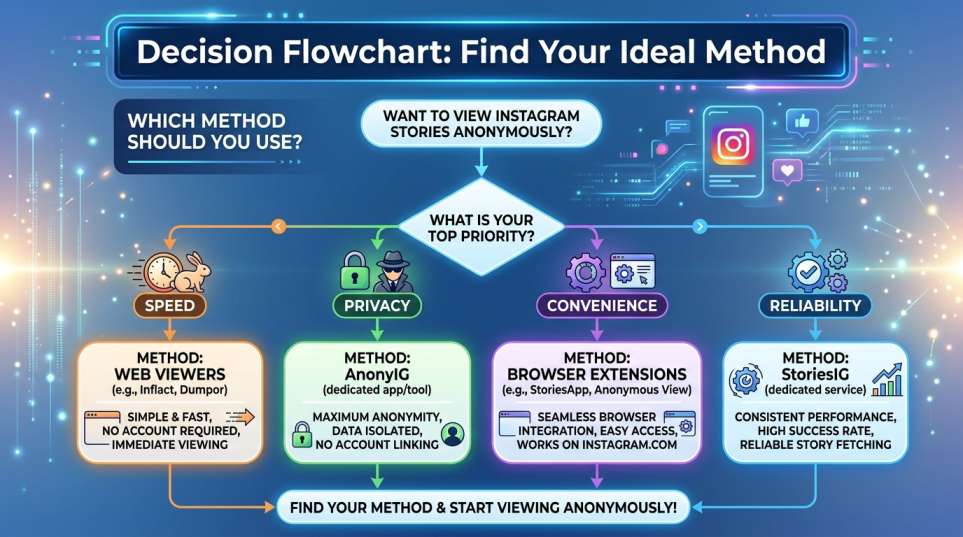
Convenience matters. If you use Instagram regularly in a browser, an extension adds viewing to your workflow without friction. One click, and you're done. No leaving the site. But this only works on desktop.
Reliability matters. Web viewers are generally more stable than extensions because they're not tied to Instagram's interface updates. When Instagram redesigns something, extensions break. Tools usually adapt.
Here's a decision tree: Are you on mobile? Use a web viewer. Are you on desktop and spend time in a browser? Try an extension. Do you want the fastest option? Go with StoriesIG. Do you worry about privacy? Choose AnonyIG. Do you check stories once in a blue moon? The airplane mode trick might work, though it's increasingly unreliable.
No single method is objectively best. Your priorities determine your choice. Most people find that a web viewer works for every situation, so that's the safest default.
Conclusion
You have three viable ways to watch Instagram stories without appearing in the viewer list. Each has different strengths. Web-based viewers are fast and simple. The airplane mode trick requires nothing but your phone. Extensions offer one-click convenience on desktop.
None of these methods are risky for casual use. Instagram doesn't penalize viewers using these tools. Using them is legal. The process is straightforward. You don't need technical skill or special knowledge.
Pick the method that matches your situation. If you're trying it for the first time, start with StoriesIG or AnonyIG. Both are stable, fast, and easy. View a few public stories and see if it fits your needs. Once you find a tool you like, stick with it.
One final note: use these tools for legitimate reasons. Casual curiosity, competitive research, avoiding social friction — all fine. Surveillance, obsessive tracking, or circumventing blocks — all not fine. These tools are neutral. How you use them is on you.
FAQs
Can I use these tools to view private accounts?
No. If an account is set to private and you don't follow them, no tool can bypass Instagram's privacy controls. The restriction is enforced at Instagram's server level, not at the tool level. Only approved followers can see private account stories, whether they use a tool or not.
Will Instagram ban me for using anonymous story viewers?
Extremely unlikely. Instagram focuses on banning bots, spam accounts, and automated scrapers that scrape millions of accounts. Casual users viewing stories anonymously through a tool aren't on their radar.
What if I use a tool to view a story after someone has blocked me?
This is a gray area. Technically, the tool can access the story because it's public. But if someone has blocked you, they've set a clear boundary. Circumventing that boundary with a tool is ethically sketchy and could be considered harassment depending on context and jurisdiction. Use these tools responsibly and respectfully.
Are expired stories really gone forever?
Yes. Once a story expires after 24 hours (or the account owner deletes it), the original content is gone. No tool can retrieve it. The only exception is if the account owner manually saved the story to their Highlights. In that case, tools can access it from the Highlights section, just like any regular viewer would.
Can the tool owner see my data or IP address?
Yes, but it depends on the tool. When you visit an anonymous story viewer, that tool's server logs your IP address and potentially other data like browser type or visit timestamp.
Reputable tools like StoriesIG, igstoryviewers and AnonyIG have clear privacy policies stating they don't sell or misuse this data. Always check a tool's privacy policy before using it. If the privacy policy is unclear or missing, find a different tool.
Is my Instagram account at risk if I use these tools?
If you use a tool while logged into your Instagram account in another browser tab, there's a theoretical risk that Instagram could connect the activity to your account. In practice, this doesn't happen for casual viewers.
Keep reading
Free Instagram Story Downloader: Save HD Stories Without Watermark
Instagram Stories allow creators, businesses, and influencers to publish transient moments that expire after 24 hours. While Instagram allows users to bookmark posts internally, it offers no native me
Instagram Post Downloader - Save IG Posts & Carousels in HD
Instagram feed posts, carousel albums, and single-image uploads contain some of the most engaging visual content on the internet. Whether you are preserving inspirational artwork or archiving marketin
Instagram Highlights Downloader: Save IG Highlights & Stories in HD
Instagram Highlights are among the most valuable features on the platform for creators, influencers, brands, and everyday users. Unlike standard 24-hour Stories that vanish automatically, Highlights r