
·Published by Syed Abdullah Shah·8 min read
Instagram Story Not Loading? 9 Fixes That Work
Instagram stories spinning or showing a black screen? Find out if Instagram is down, then work through 9 quick fixes for iPhone and Android.
On 5 March 2024, Instagram stopped loading for millions of people at once. Downdetector logged about 70,000 Instagram reports at the peak, and the app took around two hours to recover. Outages like that make the news because they're rare. Most of the time, a story that spins forever is a problem on your own phone.
The short answer: If Instagram stories won't load, first check whether Instagram is down for everyone. If it isn't, close and reopen the app, switch between Wi-Fi and mobile data, and turn off Instagram's Data saver. Updating the app and clearing its cache fix most of the rest.
This guide is for stories that won't load or play at all. If everyone's stories work except one person's, that's a different problem. Our guide on why you can't see someone's Instagram story covers hidden stories, Close Friends and blocks.
Is Instagram down, or is it just you?
Spend 30 seconds on this before you change any settings. If Instagram itself is broken, nothing on your phone will fix it.
- Open Downdetector's Instagram page. A sharp spike in reports over the last hour means a wider outage.
- Search "Instagram down" on X or Threads. People post within minutes when the app breaks.
- Ask a friend on a different network to open a story. Their result tells you a lot.
Match what you see to the likely cause before you start fixing.
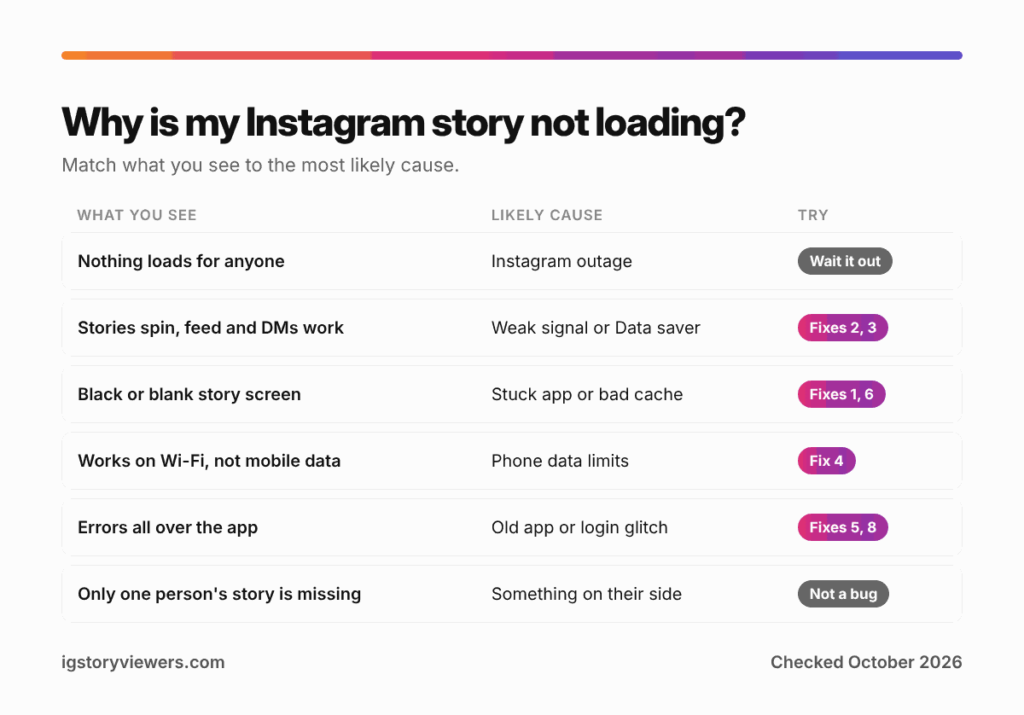
| What you see | Likely cause | Start with |
|---|---|---|
| Nothing loads for anyone, and Downdetector is spiking | Instagram outage | Wait it out |
| Stories spin, but the feed and DMs work | Weak connection or Data saver | Fixes 2 and 3 |
| Black or blank screen where the story should be | Stuck app or corrupt cache | Fixes 1 and 6 |
| Stories load on Wi-Fi but not on mobile data | Data limits on your phone | Fix 4 |
| "Couldn't refresh feed" or similar errors everywhere | Old app version or a login glitch | Fixes 5 and 8 |
| Everything works except one person's story | Something on their side | This guide instead |
9 fixes for Instagram stories that won't load
Work through these in order. The quick ones come first, and each takes under two minutes.
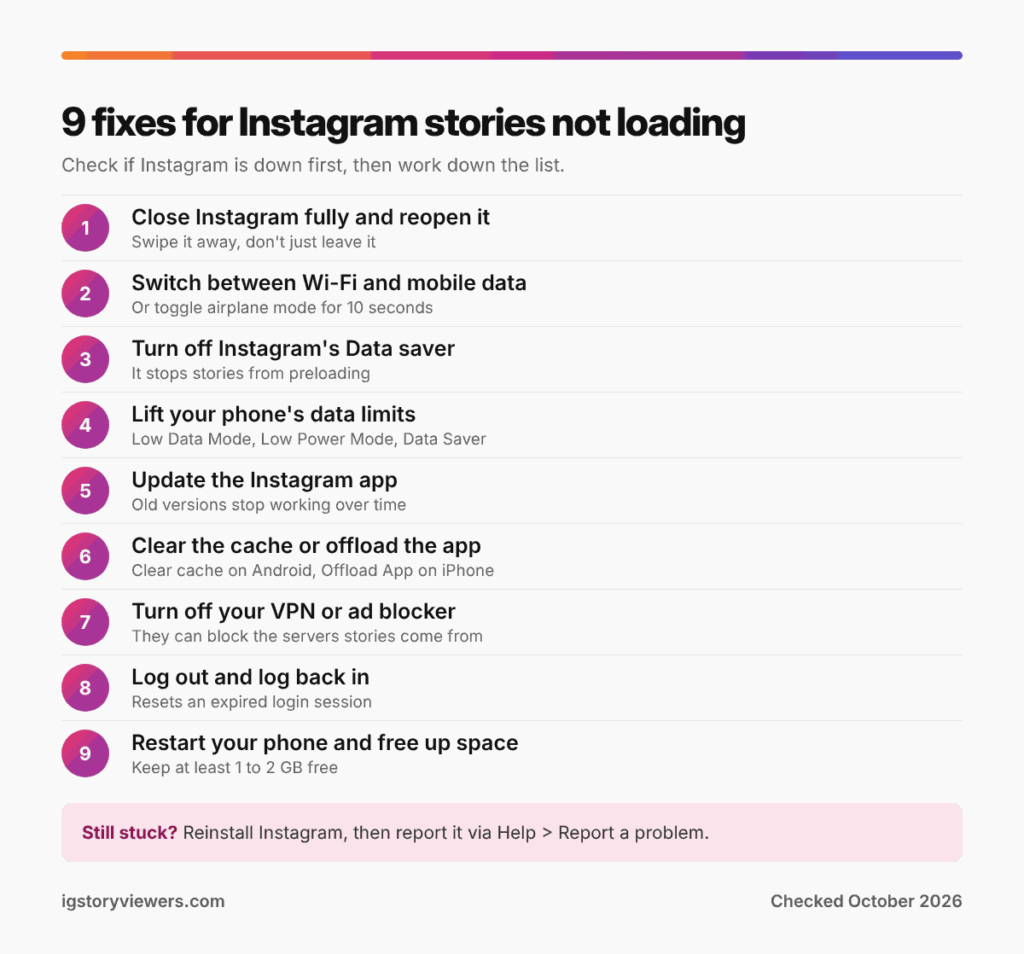
1. Close Instagram fully and reopen it
Swiping back to your home screen leaves the app running in the background. Close it properly instead. On iPhone, swipe up from the bottom, pause, then flick Instagram off the top. Android users can open recent apps and swipe Instagram away.
A fresh start clears whatever request got stuck. It solves more loading problems than you'd expect.
2. Switch between Wi-Fi and mobile data
Stories are short videos, so they need a steadier connection than text or photos. Your browser might load web pages fine on a weak signal while stories keep buffering. Try the other network. If you're on Wi-Fi, turn it off and use mobile data for a minute, or the other way around.
Turning airplane mode on for ten seconds, then off again, also resets a connection that's gone stale. Public Wi-Fi at cafes and airports often blocks video until you accept a login page in your browser.
3. Turn off Instagram's Data saver
Instagram's Help Center explains that the app preloads videos so they start faster. Data saver stops that preloading on mobile data. Stories then load only when you tap them, which feels like they're stuck.
- Go to your profile and tap the three lines at the top right.
- Open Data usage and media quality.
- Turn off Data saver (called "Use less cellular data" in some versions).
4. Lift your phone's own data limits
Your phone can throttle Instagram even when the app's setting is off. These limits often switch on by themselves when your battery runs low.
- iPhone: Turn off Low Power Mode in Control Center. Then check Settings > Mobile Service > Mobile Data Options and make sure Low Data Mode is off. Scroll down the Mobile Service page too, and confirm Instagram's toggle is on.
- Android: Turn off Data Saver and Battery Saver in Quick Settings. Then go to Settings > Apps > Instagram > Mobile data and allow background data.
Menu names differ a little between phone brands, so search "data saver" in Settings if you can't find them.
5. Update the Instagram app
Instagram drops support for old app versions over time. Its Help Center notes that problems can start when you're using an old version that's no longer supported. Open the App Store or Google Play, search Instagram and tap Update if you see it.
Update your phone's system software too while you're there. New Instagram versions sometimes need a recent iOS or Android release.
6. Clear the cache on Android or offload on iPhone
Instagram stores bits of stories and images so it doesn't download them twice. If that cache gets corrupted, stories can show a black screen or freeze on the first frame.
- Android: Press and hold the Instagram icon, tap App info, open Storage and tap Clear cache. Don't tap "Clear storage" or "Clear data" unless you're ready to log in again.
- iPhone: iOS has no clear-cache button. Go to Settings > General > iPhone Storage > Instagram and tap Offload App, then reinstall it. Offloading removes the app but keeps your documents and data.
7. Turn off your VPN or ad blocker
VPNs route your traffic through another server, which can slow video or trip Instagram's security checks. Some ad blockers and custom DNS apps also block the servers that deliver stories. Pause them, reopen Instagram and try again.
School and office Wi-Fi networks block social media video in a similar way. Switching to mobile data tells you quickly if the network is the issue.
8. Log out and log back in
An expired login session can leave parts of the app half working. Your feed shows old posts, but new stories never arrive. Go to the three-line menu, scroll to the bottom and tap Log out. Make sure you know your password first.
9. Restart your phone and free up some space
A restart clears memory and network glitches that a single app can't fix. Phones that are almost full also struggle to load video, since Instagram has nowhere to put new story files. Try to keep at least 1 to 2 GB free.
If stories still won't load after all nine fixes, delete Instagram and install it fresh. Your posts, messages and followers live on Instagram's servers, so you won't lose them. Unpublished drafts are saved on the phone, though, so post or save them first.
When DMs, the feed or the whole app won't load
The same fixes apply when Instagram messages aren't showing or the whole app won't load. A few patterns help you narrow it down.
- Only DMs are stuck: Messages sometimes fail during partial outages while the feed works. Check Downdetector first, then log out and back in.
- The feed is stuck but DMs work: Pull down to refresh once, then wait. Repeated refreshing can trigger a short rate limit.
- The app won't open at all: Update it, then restart your phone. If it still crashes, reinstall it.
Try the story in a web browser
A browser skips the app completely, so it tells you whether the app or your account is at fault. Log in at instagram.com on your phone or computer and open the story there.
For public accounts, you can also paste the username into our story viewer. It loads public stories without the app or a login. Private accounts and Close Friends stories stay hidden, though. The viewer won't help during a full Instagram outage either, since every story comes from Instagram's servers.
Report the problem to Instagram
If stories still won't load and Instagram isn't down, tell Instagram. The app lets you report a technical problem from inside it. Go to your profile, tap the three lines, then Help and Report a problem.
Shaking your phone while the app is open also opens the report form, if that option is turned on. Add a screen recording of the stuck story. Instagram's team can act on a recording much faster than a written description.
FAQ
Why are Instagram stories not loading but posts are?
Stories are video, while most feed posts are photos that need far less data. A weak signal or Data saver can load photos fine and still stall stories. Fixes 2, 3 and 4 above usually solve it.
Why do Instagram stories show a black screen?
A black screen usually means the app got stuck mid-download or the cache is corrupted. Close the app fully, then clear the cache on Android or offload the app on iPhone.
Is Instagram down today?
Check Downdetector's Instagram page and search "Instagram down" on X. If many people report problems in the same hour, it's an outage, and you'll need to wait for Instagram to fix it.
Why isn't my Instagram loading on Wi-Fi?
The Wi-Fi network may be slow, blocking social media, or waiting for you to accept a login page. Switch to mobile data. If Instagram works there, the Wi-Fi network is the problem.
Will clearing the Instagram cache delete anything?
Clearing the cache on Android keeps your login, posts and messages. "Clear storage" or "Clear data" logs you out and can erase unpublished drafts saved on the phone.
Why do stories keep skipping or buffering halfway?
Your connection is dropping in and out, or the next story hasn't preloaded. A steadier network and turning off Data saver both help.
The bottom line on stories that won't load
Check whether Instagram is down first, since no fix works during an outage. If it's just you, restart the app, switch networks and turn off Data saver. Those three steps solve most cases. Updating the app, clearing its cache and logging back in handle nearly everything else.
Need to watch a public story while the app acts up? Paste the username into our public story viewer, no app or login needed.
Keep reading
- Instagram Tips
How to See Your Old Instagram Stories (and Your Watch History)
Instagram saves your expired stories in a private archive. Find them in a minute, fix an empty archive, restore deleted stories and check your Reels watch history.
- Instagram Tips
How to Share an Instagram Post to Your Story (or a DM)
One button handles almost all sharing on Instagram. Here's how to put a post on your story, send it in a DM or copy its link.
- Instagram Tips
Does Instagram Notify When You Screenshot a Story? (2026)
Instagram doesn't tell anyone when you screenshot or screen record a story. Here's where screenshots do matter in DMs, plus every rule in one table.