
·Published by Syed Abdullah Shah·8 min read
How to Share an Instagram Post to Your Story (or a DM)
One button handles almost all sharing on Instagram. Here's how to put a post on your story, send it in a DM or copy its link.
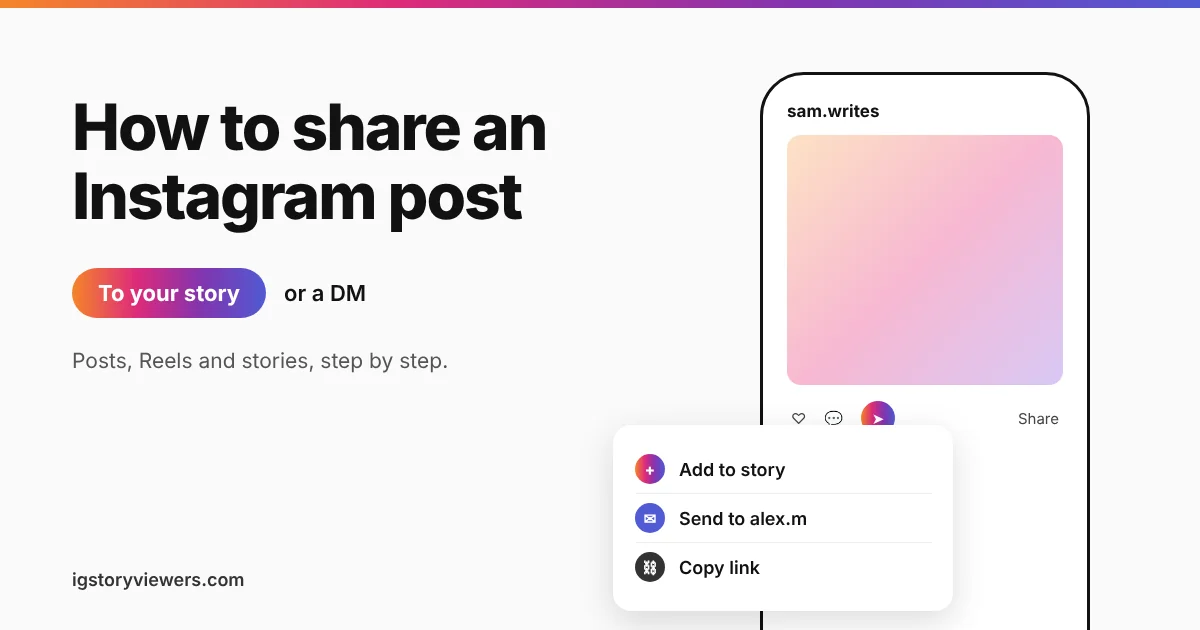
Every Instagram post and Reel has a small paper airplane icon under it. That one button handles almost all sharing on Instagram. It can put a post on your story, send it to a friend in a DM or copy a link for WhatsApp.
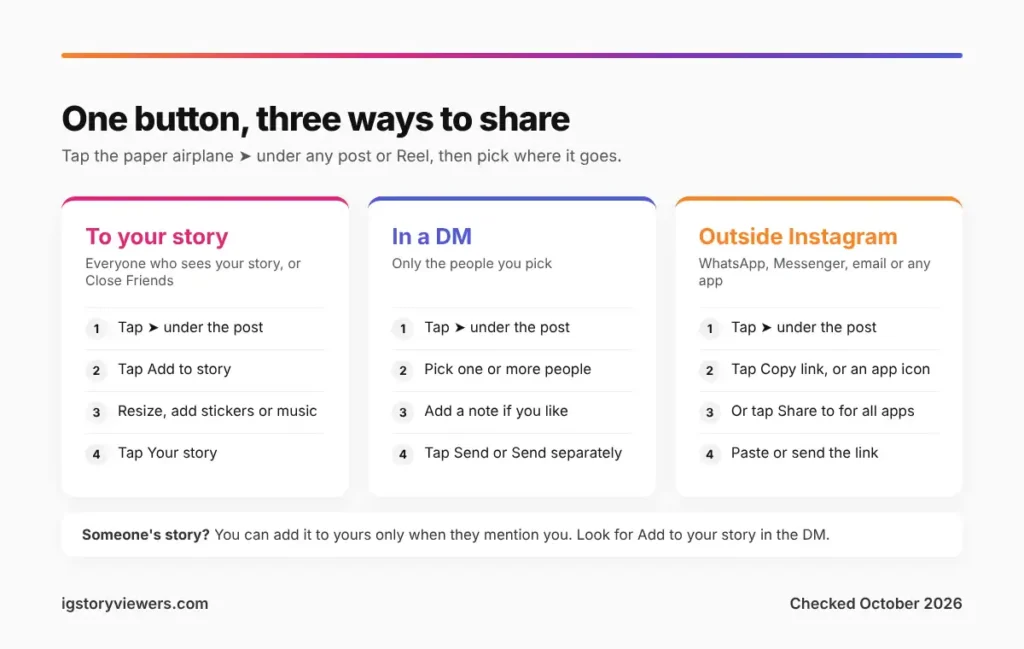
The short answer: To share an Instagram post to your story, tap the paper airplane under the post, then tap Add to story. Move or resize the post, add stickers if you like, and tap Your story. To send it in a DM instead, tap the paper airplane, pick a person and tap Send.
Below you'll find the steps for posts, Reels and other people's stories. We also cover sending posts privately and what to check when the Add to story button is missing.
How do you share an Instagram post to your story?
This works for your own posts and for public posts from other accounts. The steps are the same on iPhone and Android.
- Find the post in your feed or on the account's profile.
- Tap the paper airplane icon under the photo or video.
- Look for Add to story in the row of options at the bottom of the share menu and tap it.
- The post opens in the story editor as a card. Pinch to resize it, drag it into place or tap it to switch between card styles.
- Add text, music, a GIF or a mention if you want. You can also change the background color with the color picker at the top.
- Tap Your story to share it with everyone, or Close Friends for a smaller group.
Your viewers see the post as a sticker on your story. Tapping it shows a View post button that opens the original. The original account keeps the credit, since its username stays on the card.
Share a carousel or a Reel to your story
Carousels and Reels use the same paper airplane. A carousel shares the slide you were looking at when you tapped Share. Swipe to your favorite slide first if you want that one on the card.
Reels play inside your story as a short preview with the original audio. Viewers tap the Reel to open it in full. On some Reels the button reads Add Reel to your story instead of Add to story, but it does the same thing.
How to share someone's story to your story
Instagram only lets you add another person's story to yours when they mention you in it. You'll get a DM that says they mentioned you in their story.
- Open the DM, or tap the notification.
- Tap Add to your story (on some versions it says Add this to your story).
- Edit it like any other story, then tap Your story.
That button only lasts as long as the story does. Once their story expires after 24 hours, the option goes with it.
Without a mention, there's no built-in way to reshare someone else's story. You can still send it to a friend with the paper airplane at the bottom of the story, if the owner allows it. Want to be the one who gets reshared? Our guide on how to tag people on Instagram shows how mentions work in stories.
How to send an Instagram post to someone in a DM
Sending a post privately is often better than a story share. Only the person you pick sees it, and they can reply right there.
- Tap the paper airplane under the post.
- Pick one or more people from the list, or search for a name at the top.
- Type a message in the box if you want to add a note.
- Tap Send, or Send separately when you've picked several people.
Picking several people at once can create a group chat. Send separately keeps each message in its own private chat instead.
Stories work the same way. Open the story and tap the paper airplane at the bottom. If you don't see it, the owner has turned off sharing their stories as messages.
What the other person sees
Your friend gets the post as a preview in your chat. If the post comes from a private account they don't follow, the preview stays hidden. They'll see a message that the post is unavailable. That's the same rule that keeps private profiles locked, which our guide to viewing a private Instagram account explains.
Copy a post link or share it outside Instagram
The share menu also works for apps like WhatsApp, Messenger or email. Tap the paper airplane and look at the bottom row.
- Copy link puts the post's web address on your clipboard. Paste it anywhere.
- WhatsApp, Messenger or Facebook appear as their own buttons when those apps are installed.
- Share to (or Share via on Android) opens your phone's full share sheet with every app you have.
A copied link opens the post in the Instagram app or in a browser. Anyone can view a public post that way, even without an account. Need the link to your whole profile rather than one post? Our guide on how to find your Instagram URL walks through it.
Why can't I share a post to my story?
A missing Add to story button almost always has a simple cause. Work through this list from the top.
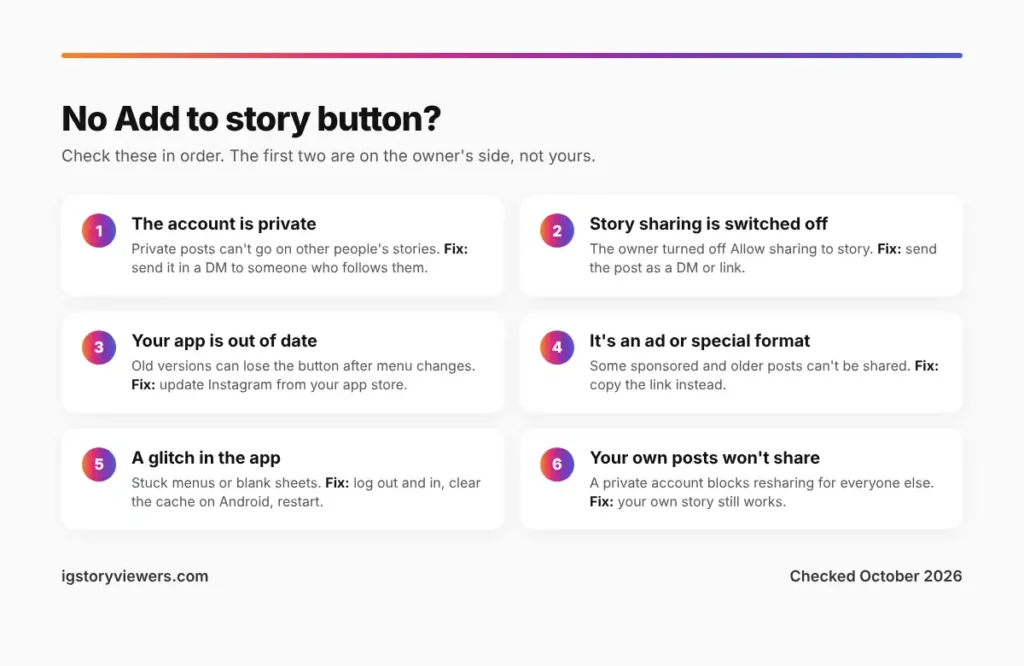
- The account is private. Posts from private accounts can't go on anyone else's story. You can still send them in a DM to people who follow that account.
- Story sharing is switched off. Any public account can switch off resharing in its settings. When that happens, the button simply isn't there.
- Your app is out of date. Older versions sometimes lose the button after Instagram changes the share menu. Update the app from your app store and try again.
- The post is an ad or a special format. Some sponsored posts and a few older formats can't be shared to stories.
- A glitch in the app. Log out, log back in and clear the cache on Android. If stories won't load or post at all, our guide to fixing an Instagram story that's not loading covers the full list of fixes.
Your own posts can be blocked by your settings too. If you switched your account to private, only you can share your posts to your own story.
Control who can share your posts and stories
You decide whether other people can reshare what you post. Open your profile, tap the three lines, then go to Settings and activity > Sharing and reuse.
| Setting | What it controls |
|---|---|
| Allow sharing to story | Whether people can add your posts and Reels to their own stories |
| Allow sharing to messages | Whether people can send your stories to others in DMs |
Labels change between app versions, so look for these words if the menu looks different. A private account already blocks story shares by anyone else.
Turning these off doesn't stop screenshots. If that worries you, our guide on whether Instagram notifies screenshots explains what people can capture. To keep one person away from your stories entirely, see how to hide your Instagram story from someone.
How do you post a new story on Instagram?
Maybe you want to share something of your own rather than a post. Here's how to make a story from scratch.
- Swipe right from your feed, or tap the + on your profile picture at the top of the feed.
- Take a photo or video, or swipe up to pick one from your camera roll.
- For a text-only story, swipe the bottom menu to Create. Create mode gives you colored backgrounds, templates and question stickers.
- Add stickers, text or music, then tap Your story.
Stories stay up for 24 hours. Save the good ones to a Highlight from your profile so they stay longer.
FAQ
Does Instagram notify someone when you share their post to your story?
No. Instagram doesn't send an alert when you add someone's post to your story. Creator and business accounts can see a total share count in the post's insights, but not who shared it.
Can you see who shared your Instagram story?
Only partly. You can see when someone you mentioned reshares your story, since their story shows your name. For the rest, our guide on who viewed my Instagram story covers what the viewer list and insights show.
Can you share a post to your story without the post showing?
Not directly. The card always shows the post. Some people cover it with a sticker or photo, but the View post link still appears for viewers who tap it.
How do you share an Instagram post on Facebook?
Tap the paper airplane and choose Facebook, if your accounts are linked in Accounts Center. You can also copy the link and paste it into a Facebook post.
Can you add a link to a post you share on your story?
The shared post links back to the original automatically. For any other website, add the Link sticker from the sticker tray before you post the story.
Why does my shared post look blurry on my story?
Stretching the card too large makes it soft. Keep it near its starting size, and check your Wi-Fi or data saver settings, which can lower upload quality.
The bottom line on sharing Instagram posts
One button does nearly all of it: the paper airplane. Tap it, then pick Add to story for your followers, a name for a private DM or Copy link for any other app.
When the button won't show, check whether the account is private or has sharing turned off. Then update the app before you try anything else.
Keep reading
- Instagram Tips
How to See Your Old Instagram Stories (and Your Watch History)
Instagram saves your expired stories in a private archive. Find them in a minute, fix an empty archive, restore deleted stories and check your Reels watch history.
- Instagram Tips
Does Instagram Notify When You Screenshot a Story? (2026)
Instagram doesn't tell anyone when you screenshot or screen record a story. Here's where screenshots do matter in DMs, plus every rule in one table.
- Instagram Tips
How to Tag People on Instagram (Posts, Stories and Reels)
Tap Tag people on posts and Reels, or type @ in stories and comments. Here's every way to tag someone on Instagram, including after posting.