
·Published by Syed Abdullah Shah·8 min read
Does Instagram Notify When You Screenshot a Story? (2026)
Instagram doesn't tell anyone when you screenshot or screen record a story. Here's where screenshots do matter in DMs, plus every rule in one table.
In February 2018, Instagram tested a small icon that showed up next to anyone who screenshotted a story. People complained loudly, and Instagram quietly dropped the test that June. More than eight years later, that icon has never come back.
The short answer: No. Instagram does not notify anyone when you screenshot or screen record their story. That covers regular stories, Close Friends stories and Highlights. Screenshots only matter in your DMs, where disappearing photos and vanish mode follow their own rules.
We run a public story viewer, so we keep a close eye on what Instagram shows story owners. Below you'll find what triggers an alert today, what never does, and how to protect your own stories.
Instagram doesn't tell anyone when you screenshot a story
Open the viewer list on your own story and you'll see names, likes, replies and sticker taps. Nothing on that screen marks who took a screenshot. The owner also gets no push notification, no DM and no badge in their activity feed.
Screen recording works the same way. You can record a full story with sound, and the person who posted it won't know. Your name still appears in their viewer list, though, because you watched it while logged in.
Close Friends stories work the same way
A green ring means the story went to a smaller list, not that it has extra protection. Screenshots of Close Friends stories send no alert either. Many people assume otherwise and share more there than they would publicly.
Highlights don't send alerts either
Highlights are just old stories pinned to a profile. Anyone who can see the profile can screenshot them without a trace. Highlights don't even track viewers after the first 48 hours, so they leave even less behind than a live story.
What happened to the screenshot alert Instagram tested in 2018
The 2018 test reached a small group of users. Those who screenshotted a story got a warning that the owner would see it next time. Owners saw a small icon beside that person's name in the viewer list.
Instagram never rolled it out to everyone. By June 2018 Instagram confirmed the test was over, and story screenshots have stayed private ever since.
So why does the rumor keep coming back? Snapchat has always flagged screenshots, and people mix the two apps up. Instagram's DMs also show screenshot notices for disappearing media, which feels like proof that stories do too. Old articles from 2018 still rank in search and add to the confusion.
Where Instagram does react to screenshots in your DMs
Direct messages are the one place Instagram still pays attention to screenshots. The rules change based on how the photo or chat was sent.
View-once and allow-replay photos and videos
Disappearing photos and videos used to work like Snapchat. You could screenshot them, but the sender saw a notice in the chat. In October 2024, Instagram went further and said it would block screenshots and screen recordings of this media completely.
On a current version of the app, a screenshot of a view-once photo usually comes out black. Instagram also stopped letting people open view-once or allow-replay media on desktop. If you're on an older app version, the sender may still see the old screenshot notice instead.
Vanish mode chats
Vanish mode makes messages disappear once both people leave the chat. Take a screenshot or screen recording during a vanish mode chat and the other person gets notified. Instagram treats this as fair warning, since the whole point of vanish mode is that nothing sticks around.
Normal messages and shared posts
Regular chats are a different story. Screenshot a normal text message, a shared Reel or a photo sent the standard way, and nobody gets told. The same goes for group chats.
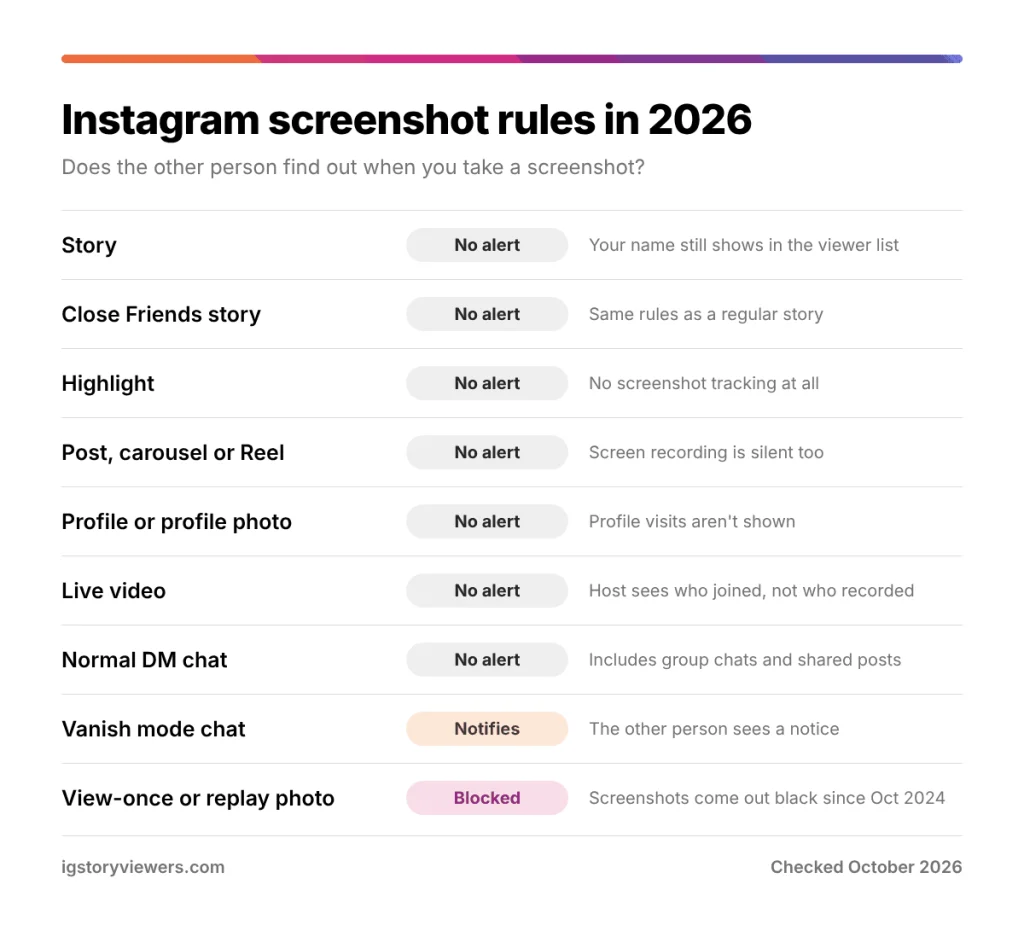
Every Instagram screenshot rule in one table
| What you screenshot | Does the owner get notified? | Notes |
|---|---|---|
| Story | No | Your name still shows in the viewer list if you watched while logged in |
| Close Friends story | No | Same rules as a regular story |
| Highlight | No | Viewer names stop showing after 48 hours |
| Feed post or carousel | No | Posts never track screenshots |
| Reel | No | Screen recording a Reel sends no alert |
| Profile or profile picture | No | Instagram doesn't show who visited a profile |
| Live video | No | The host can see who joined, not who recorded |
| Normal DM chat | No | Includes group chats and shared posts |
| View-once or allow-replay photo or video | Blocked | Screenshots and recordings have been blocked since October 2024 |
| Vanish mode chat | Yes | The other person sees a screenshot notice in the chat |
Can you find out who screenshotted your story?
You can't, and no app can tell you either. Instagram doesn't record story screenshots anywhere, so there's no data for a third-party tool to read. Apps that promise a "who screenshotted my story" list usually want your Instagram password, and that's the real goal.
Professional accounts get a little more detail in story insights. You'll see how many times a story was shared through DMs, plus replies and profile visits. Screenshots aren't counted in any of those numbers.
Your best clue usually comes from other people. If a friend mentions something you only posted to your story, someone probably saved it or showed it to them. Instagram won't confirm who did it.
How to keep people from saving your stories
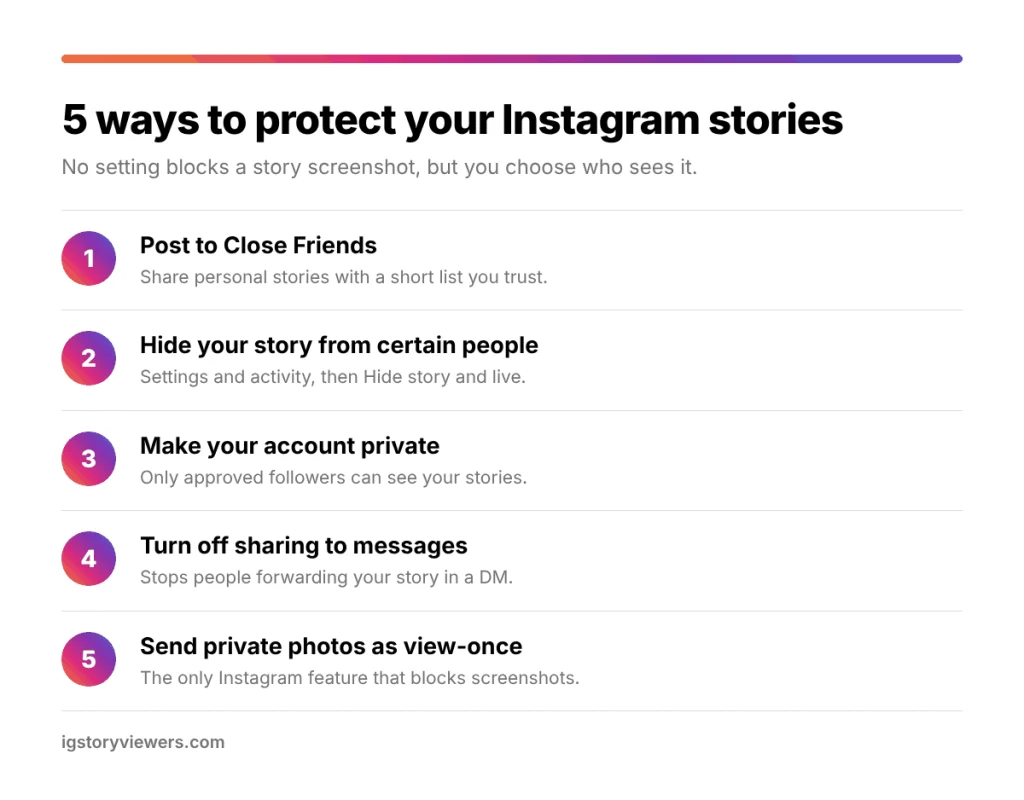
No setting stops a screenshot of a story. You can, however, control who sees each story in the first place. Fewer viewers means fewer chances for a screenshot to travel.
- Post to Close Friends. Build a short list of people you trust and share personal stories only with them.
- Hide your story from specific people. Go to Settings and activity, then Hide story and live, and pick the accounts. They won't see your story or know you hid it.
- Make your account private. Only approved followers can see a private account's stories, which also keeps public viewer sites out.
- Turn off story sharing to messages. In your story settings you can stop people from forwarding your story in a DM. It won't stop screenshots, but it removes the easiest way to pass a story on.
- Send sensitive photos as view-once DMs. This is the only Instagram feature that actually blocks screenshots today.
Switching to a private account is the strongest protection. No tool can download a private Instagram story without the owner's approval, as we explain in can you download private Instagram stories.
The simplest rule still works best. If you'd be upset to see a story in someone's camera roll, don't post it to your story.
When a friend suddenly can't see your stories, one of these settings is often the reason. Our guide on why you can't see someone's Instagram story walks through each cause.
Does watching a story anonymously change anything?
The viewer list gives you away, not the screenshot. Watch a story in the Instagram app and your name lands in that list either way.
A public story viewer works differently. You paste a public username into our story viewer and watch the story in your browser without logging in. Your name doesn't appear in the owner's viewer list, because Instagram never sees your account. You can also download the original photo or video instead of taking a cropped screenshot.
This only works for public accounts. Private profiles stay locked, and we don't keep copies of stories after they expire. Read more about how to view Instagram stories anonymously and what that really means. You can also check who viewed your Instagram story to see exactly what the owner's list shows.
FAQ
Can someone see if I screenshot their Instagram story?
Instagram doesn't show story owners who took a screenshot, so they can't tell. They only see who viewed the story, plus any likes, replies or sticker taps.
Does Instagram notify when you screen record a story?
Screen recording a story sends no alert, just like a screenshot. Only view-once DM media and vanish mode chats react to recordings.
Does Instagram tell people when you screenshot a post or Reel?
Feed posts, carousels and Reels never send screenshot notifications. You can save a public Reel as a video file with our Reels downloader instead.
Does Instagram notify screenshots in DMs?
Instagram reacts to DM screenshots in only two cases. Vanish mode chats notify the other person, and view-once or allow-replay photos block screenshots entirely. Normal messages and shared posts send no alert at all.
Will Instagram bring back story screenshot notifications?
Nothing official has been announced about bringing them back. Instagram's recent screenshot changes focused on private DMs, where the risk of misuse is higher. We'll update this post if that changes.
Can someone tell if I pause or replay their story?
Pausing a story by holding your finger on it sends no signal. Watching it twice also doesn't show up, because each person appears in the viewer list only once.
The bottom line on story screenshots
You can screenshot or record any Instagram story, including Close Friends stories and Highlights, and the owner won't be told. Screenshots only trigger a response in DMs, where vanish mode sends a notice and view-once media blocks them. If you post stories yourself, use Close Friends and Hide story to pick your audience.
Want to watch a public story without landing in the viewer list? Open the story viewer and paste a username.
Keep reading
- Instagram Tips
How to See Your Old Instagram Stories (and Your Watch History)
Instagram saves your expired stories in a private archive. Find them in a minute, fix an empty archive, restore deleted stories and check your Reels watch history.
- Instagram Tips
How to Share an Instagram Post to Your Story (or a DM)
One button handles almost all sharing on Instagram. Here's how to put a post on your story, send it in a DM or copy its link.
- Instagram Tips
How to Tag People on Instagram (Posts, Stories and Reels)
Tap Tag people on posts and Reels, or type @ in stories and comments. Here's every way to tag someone on Instagram, including after posting.