
·Published by Syed Abdullah Shah·7 min read
How to See Your Old Instagram Stories (and Your Watch History)
Instagram saves your expired stories in a private archive. Find them in a minute, fix an empty archive, restore deleted stories and check your Reels watch history.
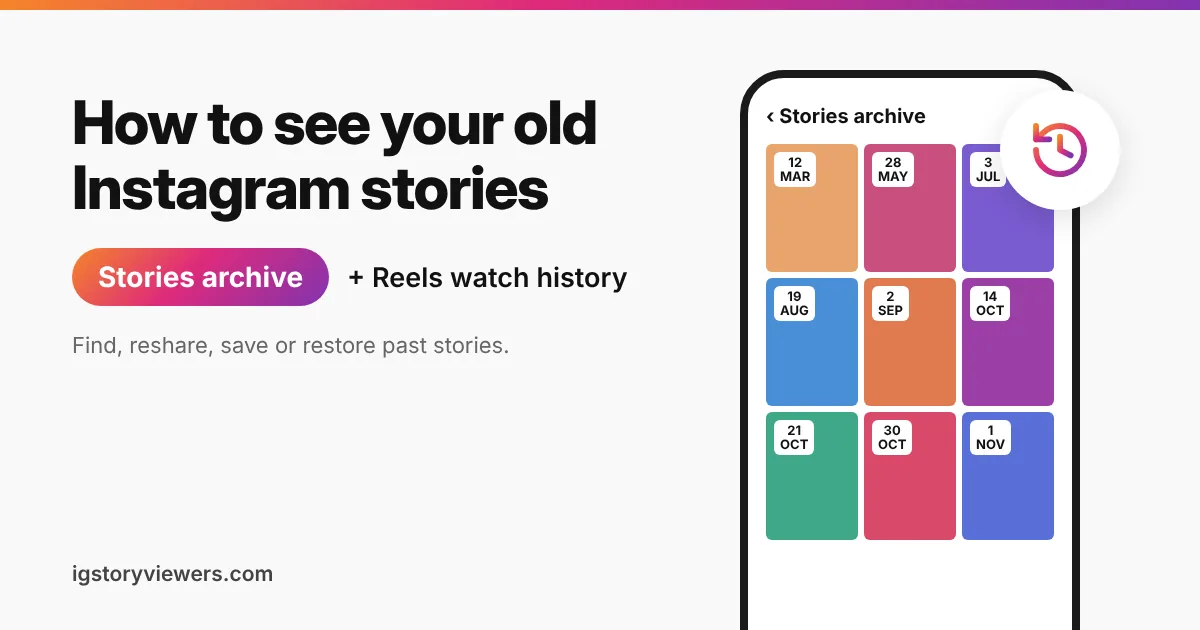
Instagram stories vanish from your profile after 24 hours, but yours aren't deleted. Unless you've switched it off, Instagram quietly copies every story you post into a private archive that only you can open. Stories from 2019 can still be sitting there, in order, waiting for you.
The short answer: To see your old Instagram stories, go to your profile, tap the three lines, and open Archive. Pick Stories archive at the top of the screen. Everything you've posted since the archive was turned on shows up there, oldest at the top and newest at the bottom.
This guide covers your own past stories, how to save or reshare them, and what to do if the archive is empty. It also explains Instagram's watch history for Reels, plus the honest answer about seeing someone else's old stories.
How to see your old Instagram stories in the archive
The steps are the same on iPhone and Android. They take less than a minute.
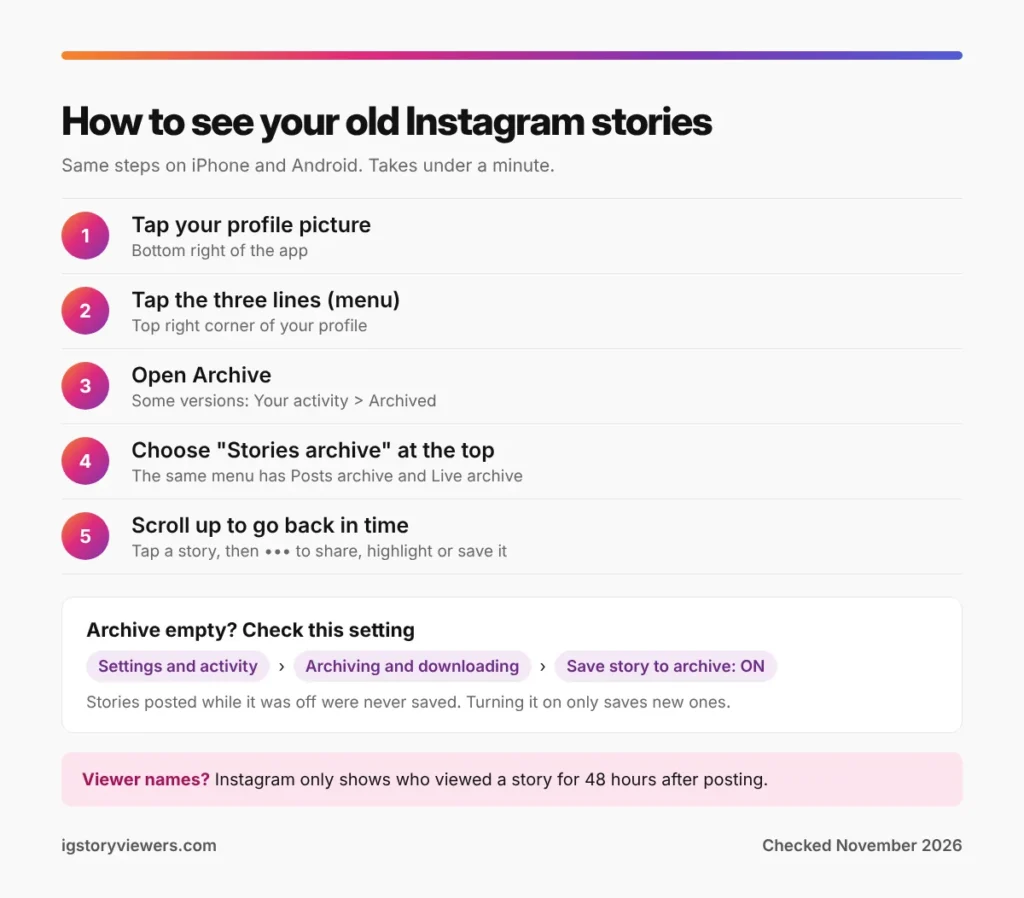
- Open Instagram and tap your profile picture at the bottom right.
- Tap the three lines (the menu) in the top right corner.
- Tap Archive. In some app versions it sits under Your activity as Archived.
- Tap the label at the top of the screen and choose Stories archive.
- Scroll up to go back in time. Tap any story to open it full screen.
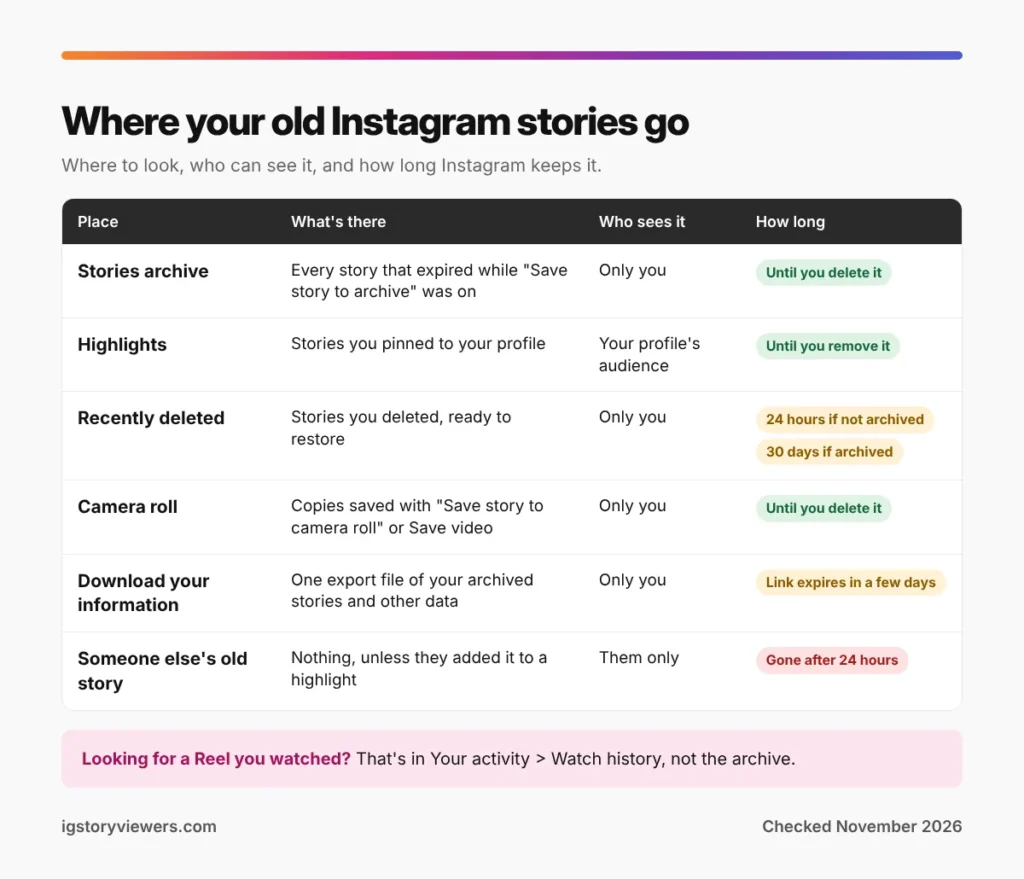
The same drop-down also lists Posts archive and Live archive. Posts you've hidden from your profile live in the first, and recent Live videos sit in the second for 30 days.
What you can do with an old story
Open an archived story and tap the three dots (or More) in the corner. You'll get a short list of options.
- Share: Posts the old story again as a fresh story for the next 24 hours. Instagram adds the original date as a small sticker, which you can drag away or delete.
- Highlight: Adds it to a highlight on your profile, so it stays visible to your followers.
- Save video or Save photo: Downloads it to your camera roll or gallery. Stickers and text stay on the saved copy.
- Delete: Removes it from the archive. It goes to Recently deleted first, so you can still change your mind.
Reposting an old story is popular around birthdays and anniversaries. Instagram helps here with On this day memories. When a story from the same date in an earlier year exists, the app may show it at the top of your feed or archive and offer to share it.
Can you see who viewed an old story?
Only for a short time. Instagram shows the viewer list for 48 hours after you post a story. After that, the archive keeps the story itself but drops the names, and nothing brings them back.
Highlights follow the same rule. Adding a story to a highlight doesn't reset the clock, so names disappear 48 hours after the original post. For the full picture of what Instagram shows and for how long, read our guide on who viewed your Instagram story.
Why your story archive is empty or missing stories
An empty archive almost always comes down to one setting. A story only lands in the archive if Save story to archive was on when it expired.
- Go to your profile and tap the three lines.
- Open Settings and activity, then Archiving and downloading.
- Turn on Save story to archive.
The setting is on by default, so most people never touch it. Stories posted while it was off, though, were never saved, and switching it on now won't recover them. That page also has Save story to camera roll, which keeps a copy on your phone as a second backup.
A few other reasons stories go missing:
- You deleted the story during its 24 hours. Deleted stories skip the archive.
- You're logged into a different account. Each account has its own archive, so switch accounts from the top of your profile.
- The app is out of date. Older versions sometimes fail to load the archive. Update Instagram, then try again.
How to get back a deleted story
Instagram keeps deleted content for a short while in Recently deleted. Go to your profile, tap the three lines, open Your activity, then Recently deleted. Tap the story and choose Restore.
Timing matters. When Instagram launched Recently deleted, it said that stories that aren't in your archive stay in Recently deleted for up to 24 hours. Posts, Reels and archived stories stay for up to 30 days. Instagram may ask you to confirm your identity with a code before it restores anything.
Once that window closes, the story is gone for good. Instagram support can't restore it, and apps that promise to are not worth the risk to your login.
Download every old story at once
Scrolling a big archive one story at a time gets slow. Instagram's Download your information tool exports your account data, archived stories included, in one file.
- Open the menu on your profile and tap Accounts Center.
- Tap Your information and permissions, then Download your information.
- Pick your Instagram account and choose the stories (or all your data).
- Choose the date range and the format, then request the download.
Instagram emails you a link when the file is ready, which can take from a few minutes to a couple of days. The link expires after a few days, so download it soon. HTML is easier to browse, while JSON suits anyone moving the data into another app.
How to see your Instagram watch history for Reels
People searching "how to check Instagram history" usually mean something else entirely. They want a Reel they watched yesterday and forgot to save. In October 2025, Instagram added a watch history for Reels that does exactly this.
- Go to your profile and tap the three lines.
- Tap Your activity.
- Open Watch history.
You can sort the list by date, filter it to the past week, the past month or a custom range, and narrow it to one creator. Swipe or tap to remove any Reel you'd rather not keep in the list.
Two limits are worth knowing. Watch history covers Reels only, so there's no list of other people's stories you've watched. Your search history is separate too, under Your activity and Recent searches.
Can you see someone else's old stories?
No. Other people's stories disappear for you after 24 hours, and their archive is private to them. Instagram has no setting, link or request that opens it, and neither does any third-party app.
There is one exception. Stories that someone added to a highlight stay on their profile until they remove them. Tap the circles under their bio to watch them. For public accounts, our highlights viewer shows those highlights without an Instagram login. Private accounts and Close Friends stories stay hidden, as they should.
Want to keep a friend's story before it expires? Our guide on saving an Instagram story before it expires covers the safe ways to do it.
FAQ
How far back does the Instagram story archive go?
It goes back to when the archive setting was first turned on for your account, which for most people is the day they joined. Instagram added the archive in late 2017, so stories older than that were not saved.
Can people see my archived stories?
No. The archive is private, and only you can open it. A story becomes visible again only if you share it or add it to a highlight.
How do I save an old story to my phone?
Open it in the Stories archive, tap the three dots, and choose Save video or Save photo. It goes to your camera roll or gallery.
Why can't I find the Archive option?
Menu names move between app versions. Look for Archive in the three-line menu, then under Your activity as Archived. Updating Instagram usually brings the menu in line with this guide.
Does deleting a story from the archive delete it from highlights?
Yes. A highlight uses the archived copy, so deleting it from the archive removes it from every highlight too.
Can I see stories I've watched on Instagram?
No. Watch history only lists Reels. Instagram keeps no list of other people's stories you've viewed.
The bottom line on old Instagram stories
Your old stories are almost always in Archive, under Stories archive, as long as Save story to archive was on. From there you can reshare them, add them to highlights or save them to your phone. Deleted stories have a short rescue window in Recently deleted, and the Reels you've watched sit in Watch history.
Curious about someone else's highlights? Paste a public username into our highlights viewer, no login needed.
Keep reading
- Instagram Tips
How to Share an Instagram Post to Your Story (or a DM)
One button handles almost all sharing on Instagram. Here's how to put a post on your story, send it in a DM or copy its link.
- Instagram Tips
Does Instagram Notify When You Screenshot a Story? (2026)
Instagram doesn't tell anyone when you screenshot or screen record a story. Here's where screenshots do matter in DMs, plus every rule in one table.
- Instagram Tips
How to Tag People on Instagram (Posts, Stories and Reels)
Tap Tag people on posts and Reels, or type @ in stories and comments. Here's every way to tag someone on Instagram, including after posting.