
·Published by Syed Abdullah Shah·8 min read
How to See Who Unfollowed You on Instagram (Without Risky Apps)
Instagram sends no alert when someone unfollows you. Here's how to find them with Instagram's own tools, no app or password needed.
Instagram keeps a list of every account that follows you, and you can download it for free. Grab a copy today and another next week, and the names missing from the second one are your unfollowers. No app, no password and no guessing.
The short answer: Instagram doesn't send an alert when someone unfollows you. To check one person, search for them in your Followers list. For a full list of unfollowers, export your followers from Accounts Center > Your information and permissions > Export your information twice and compare the two lists.
Below you'll find each safe method and what Insights shows a business account. We also cover why unfollower tracker apps put your account at risk.
Does Instagram tell you when someone unfollows you?
No. Instagram sends a notification when someone new follows you, but nothing when they leave. Your follower count simply drops by one, and the app never says who it was.
That silence works both ways. When you unfollow someone, they aren't told either. They can only find out by checking their own lists, using the same methods below.
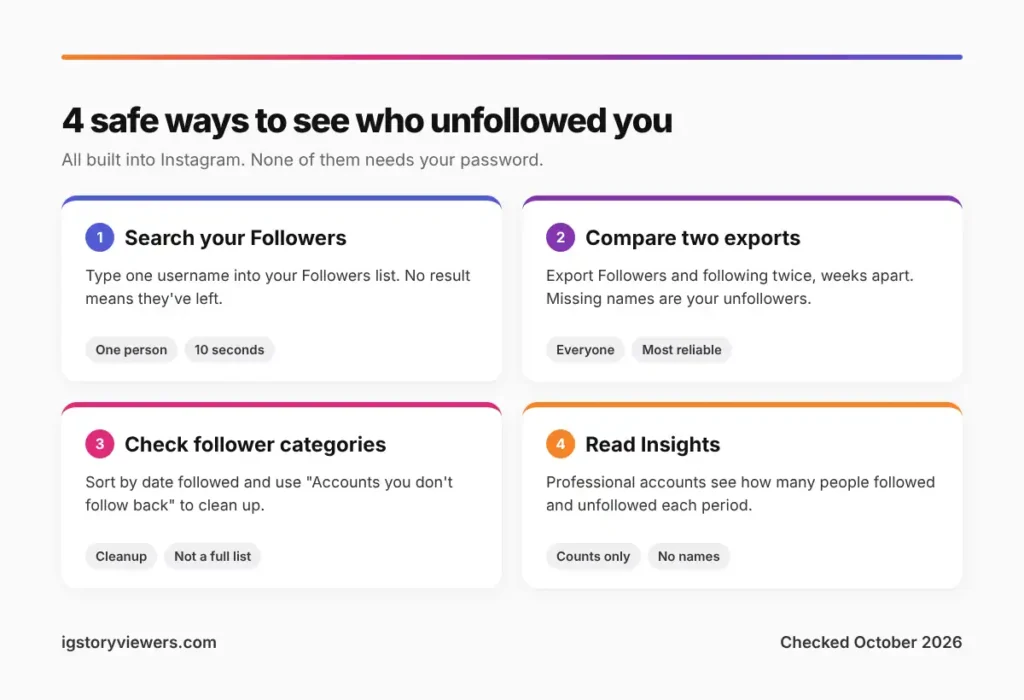
Check if one person unfollowed you
Have a specific name in mind? This takes about ten seconds.
- Open your profile and tap your Followers count.
- Type their username into the search bar at the top.
- If they don't show up, they no longer follow you.
A second check works from their side. Open their profile, tap Following and search for your own username. On a private account you don't follow, that list stays locked, so stick with your own Followers list.
One clue sits on the profile itself. When you follow each other, the button reads Following. If they follow you but you don't follow them, it reads Follow Back. A plain Follow button means neither of you follows the other.
An empty search doesn't always mean an unfollow, though. A blocked, deactivated or renamed account vanishes from your lists too. The table further down shows how to tell them apart.
Find every unfollower with Instagram's data export
The export is the most reliable method, and it's built into Instagram. It gives you your full follower list as a file, straight from Meta.
Step 1. Request your followers file
- Open your profile, tap the three lines in the top right, then tap Accounts Center.
- Go to Your information and permissions > Export your information.
- Tap Create export, pick your Instagram profile, then choose Export to device.
- Choose Customize information, clear every box except Followers and following, and save.
- Set the date range to All time and the format to JSON, then start the export.
Instagram emails you a download link when the file is ready. Small accounts usually get it within minutes, and large ones can wait a few hours. Instagram's Help Center page on your information covers the export too.
Step 2. Repeat it later and compare
Unzip the file and open the followers_and_following folder. Your followers sit in a file named followers_1.json, one username per entry. Keep it somewhere safe.
After a week or a month, run the export again. Anyone in the old file but missing from the new one has unfollowed you, deactivated, blocked you or changed their username.
Comparing the two by hand is fine for a few hundred followers. For bigger lists, a spreadsheet does it fast. Paste both lists into two columns and use a lookup to flag names that only appear in the old one. Some free websites will compare the files for you, too. Pick one that only asks for the file, never your Instagram login.
Use Instagram's follower categories
Instagram sorts your lists into a few groups that help with cleanup. Open your profile, tap Followers or Following, and look at the top of the screen.
- Accounts you don't follow back: people who follow you but you don't follow them.
- Least interacted with: accounts you've rarely liked or messaged in the last 90 days.
- Sort by date followed: in your Following list, tap the sort option and pick Latest or Earliest.
None of these is an unfollower list. They do help with a related question, which is who you follow that doesn't follow you. Pick a quiet-looking name from your Following list and search for it in your Followers list. If it's missing there, that person isn't following you anymore.
The groups vary by app version and region. If they don't appear, update Instagram and check again.
See your unfollow count in Instagram Insights
Creator and business accounts get one extra tool. Insights shows how many people followed and unfollowed you over a set period.
- Open your profile and tap Professional dashboard.
- Tap your follower total under the account insights section.
- Look for the Follows and Unfollows figures for the chosen date range.
Insights gives numbers only, never names. It's still useful for spotting patterns. A spike in unfollows the day after a certain post tells you more than any single name would.
Switching to a professional account is free and takes a minute in Settings and activity > Account type and tools. Private personal accounts lose a few privacy options when they switch, so read the screen before you confirm.
Why unfollower tracker apps are a risk
Search an app store for "unfollowers" and you'll find dozens of trackers. Almost all of them ask you to log in with your Instagram username and password. That's the problem.
Meta closed its Instagram Basic Display API in December 2024, so outside apps have no official way to read a personal account's follower list. Apps that still promise one usually sign in as you and scrape your lists. Instagram treats that as automated activity.
- Your password leaves your hands. A tracker that stores it can be hacked, sold or used to post as you.
- Your account can get flagged. Repeated logins from unknown servers trigger security checks, action blocks and, in bad cases, suspension.
- The data is often wrong. Scrapers miss accounts and mix up renamed users with unfollowers.
- Many charge a subscription for features the free export already covers.
Instagram has warned about this for years. In 2018 it started removing activity from accounts linked to third-party apps and asked affected users to change their passwords. If you already gave a tracker your login, change your password and remove the app under Accounts Center > Password and security.
Unfollowed, blocked or deactivated?
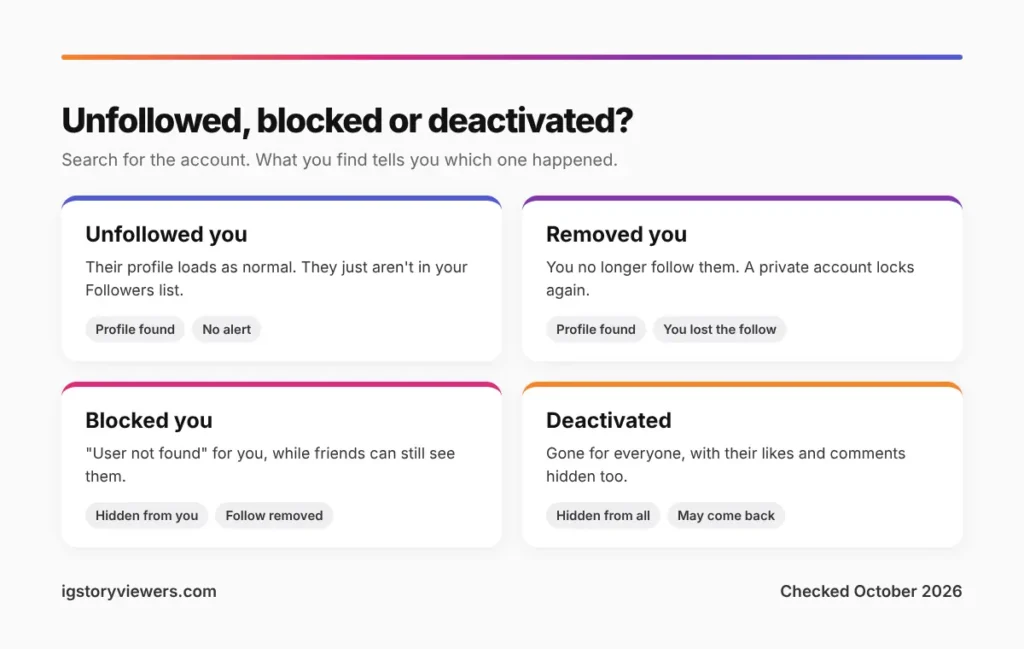
A name that drops off your Followers list can mean three different things. Searching for the account usually settles it.
| What happened | Can you find their profile? | What you'll notice |
|---|---|---|
| They unfollowed you | Yes | Profile, posts and stories (if public) load as normal. Their button says Follow or Following, never Follow Back |
| They removed you as a follower | Yes | You no longer follow them. On a private account, their posts lock again |
| They blocked you | Usually not | Search shows nothing, or "User not found", while friends can still see them |
| They deactivated or deleted | No, for anyone | Their likes and comments disappear across Instagram, not just for you |
Renamed accounts cause a lot of false alarms. Search their old name and you'll find nothing, but their new handle still follows you. Our guide on how to know if someone blocked you on Instagram has a quick test that separates a block from a deactivated account.
How to see when you followed someone
Instagram doesn't show a follow date on profiles. Your own lists still hold the order, and the export holds the exact time.
- Rough order: open your Following list, tap the sort option and choose Date followed: Earliest or Latest.
- Exact date: in the export, open following.json. Each entry carries a timestamp for when the follow happened.
The JSON timestamp is a Unix number, like 1761696000. Paste it into any free "Unix time converter" to read it as a normal date.
FAQ
Can someone see if I unfollow them on Instagram?
Not through a notification. They'd only notice by checking their Followers list, spotting a lower count or running an export of their own.
Why did my follower count drop but no one unfollowed me?
Instagram regularly removes spam and fake accounts, and that cuts follower counts across the board. People who deactivate also drop off your list until they come back.
Does Instagram notify someone if I unfollow and follow them again?
The unfollow is silent, but following again sends a fresh "started following you" notification. On a private account, it sends a new follow request instead.
Is there a safe app to see who unfollowed me?
The safest option is one that never touches your login. Instagram's free export plus a spreadsheet does the job. Any app that wants your password is a risk, however good its reviews look.
Can I see someone else's followers without them knowing?
Viewing a follower list doesn't notify anyone, so you can browse a public account's lists from your own app. Our Instagram profile viewer shows a public profile's follower and following counts without logging in, though not the full lists. Private accounts keep their lists locked, as our guide on viewing a private Instagram account explains.
Why is my followers list in a different order each time?
Instagram doesn't promise a fixed order. Your own list tends to put recent followers near the top, but mutual friends and accounts you interact with can jump ahead. That's why the order is a poor way to spot unfollowers.
The bottom line on finding your unfollowers
Instagram won't name the people who unfollow you, but it hands you everything you need to work it out. Search your Followers list for one person, compare two data exports for everyone, and use Insights if you run a professional account.
Skip any tracker that asks for your password. The few names it might find aren't worth losing your account over.
Keep reading
- Instagram Tips
How to See Your Old Instagram Stories (and Your Watch History)
Instagram saves your expired stories in a private archive. Find them in a minute, fix an empty archive, restore deleted stories and check your Reels watch history.
- Instagram Tips
How to Share an Instagram Post to Your Story (or a DM)
One button handles almost all sharing on Instagram. Here's how to put a post on your story, send it in a DM or copy its link.
- Instagram Tips
Does Instagram Notify When You Screenshot a Story? (2026)
Instagram doesn't tell anyone when you screenshot or screen record a story. Here's where screenshots do matter in DMs, plus every rule in one table.