
··Published by Syed Abdullah Shah·6 min read
How to Download Instagram Videos (iPhone, Android, PC)
Save any public Instagram video on iPhone, Android or PC, with or without an app. Three methods compared, plus where the file ends up.
Instagram makes it easy to watch a video and surprisingly awkward to keep one. The bookmark icon only saves it inside the app, and the built-in download button appears on some public Reels but not others.
The short answer: copy the video's link (Share, then Copy link), paste it into a web-based Instagram video downloader, and save the MP4. It works on iPhone, Android and computers, with no app and no login. For your own videos, use Instagram's Archive or its data export instead.
Below are three methods that work in 2026, where the file ends up on each device, and why some videos refuse to download.
Method 1: Download any public Instagram video with a link
This works for Reels and video posts from public accounts. You don't need an Instagram account.
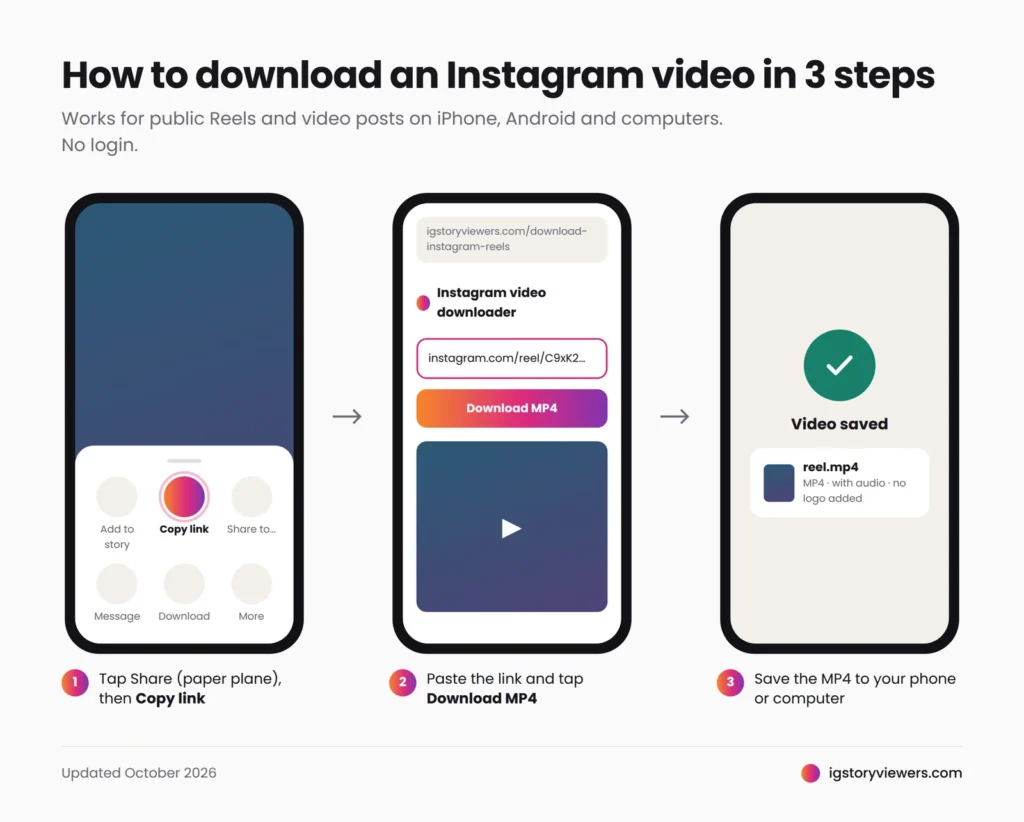
- Copy the link. In Instagram, open the video, tap the Share icon (paper plane), then Copy link. On a computer, copy the URL from the address bar. It should look like
instagram.com/reel/...orinstagram.com/p/.... - Paste it into the downloader. Open the IG Story Viewers video downloader, paste the link and tap Download MP4. A preview loads so you can check it's the right video.
- Save the file. Tap the download button. The MP4 keeps its original audio, and no logo is added.
Not sure where to find a video's link? Our guide to finding any Instagram URL shows what profile, post and Reel links look like.
The tool needs the video's link, not a username. To save someone's story instead, search their username in the story viewer and use the download button on each story. For stories they've pinned to their profile, use the Highlights viewer. If a story doesn't show up at all, here's why you can't see someone's Instagram story.
Where the downloaded video goes
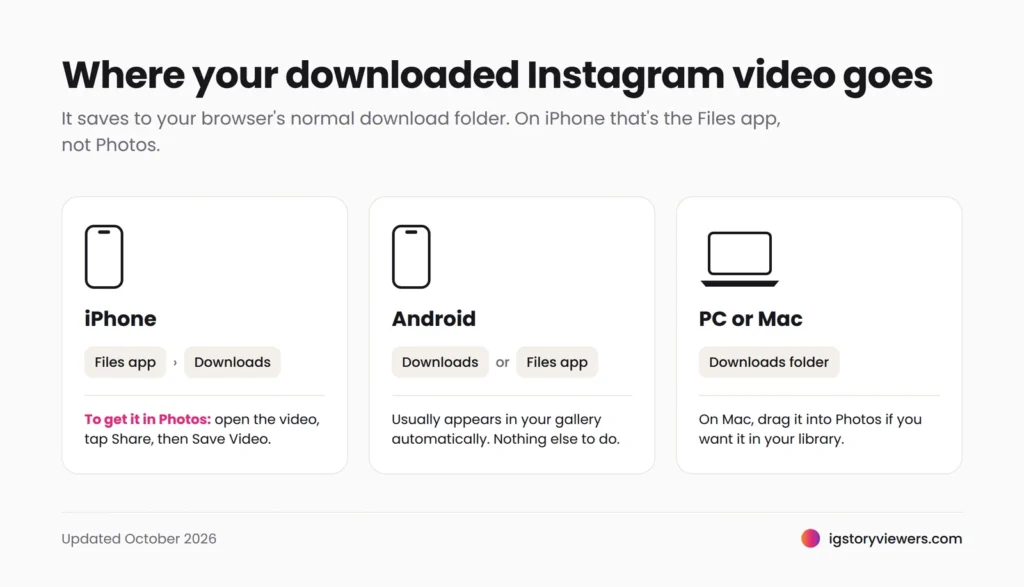
The file saves to your browser's normal download location. On iPhone, that's the Files app, not Photos, which confuses most people the first time.
| Device | Where to find it | To move it to your gallery |
|---|---|---|
| iPhone (Safari) | Files app, Downloads folder | Open the video, tap Share, then Save Video |
| iPhone (Chrome) | Files app, Chrome folder | Same as above |
| Android (Chrome) | Downloads, or the Files app | Usually appears in your gallery automatically |
| Windows PC | Your browser's Downloads folder | Not needed |
| Mac | Downloads folder in Finder | Drag into the Photos app if you want it there |
The file plays in any standard video app on all five.
Method 2: Use Instagram's own download button
Instagram lets you download some public Reels directly, but only when the creator allows it. You need to be logged in.
- Open the Reel and tap the Share icon (paper plane).
- Tap Download in the bottom row. If you don't see it, the creator has turned downloads off, or the account is private.
- The video saves straight to your camera roll.
The catch is the watermark. Instagram stamps the creator's username on the downloaded file so it stays credited when shared. Reels using some licensed music may also download without sound, or not at all.
That makes this method the best choice when you plan to share the video, because the credit is built in. For a clean file for private reference, Method 1 is better. Our guide to downloading Reels without a watermark explains the difference in detail.
Method 3: Save your own Instagram videos
For videos you posted, you don't need any outside tool.
- A Reel or video post: open it on your profile, tap More (three dots), then Download or Save to camera roll. Reels with licensed music may save without the track.
- An old story: go to your profile, open the menu, tap Archive, open the story, tap More, then Save.
- Everything at once: in Accounts Center, go to Your information and permissions, then Export your information (older app versions call it Download your information). Instagram emails you when the file is ready, usually within a day or two. Our step-by-step guide to downloading your Instagram data covers every option, and Instagram's own steps are in its Help Center.
Menu names shift a little between app versions, but these three paths have stayed stable.
Which method should you use?
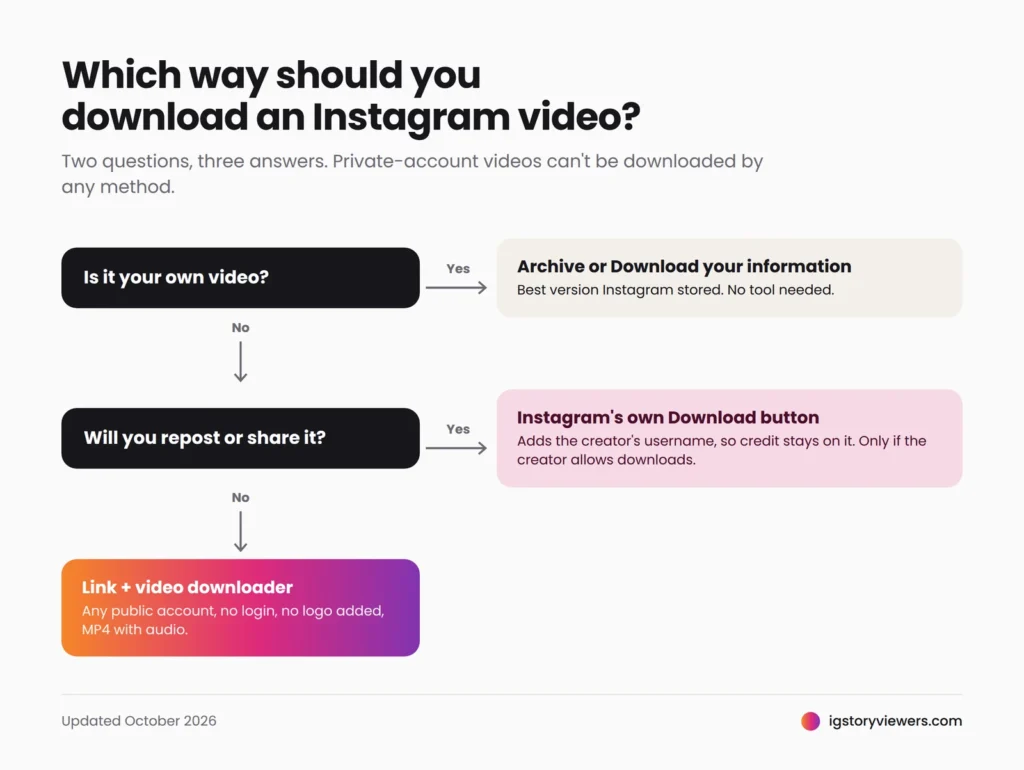
Use the link method for other people's public videos, Instagram's button when you'll share the clip, and the Archive for your own.
| Method | Whose videos | Account needed | Watermark | Quality |
|---|---|---|---|---|
| Link + video downloader | Any public account | No | None added | What Instagram serves, usually up to 1080p |
| Instagram's Download button | Public Reels, if the creator allows | Yes | Creator's username | What Instagram serves |
| Archive or data export | Your own only | Yes | None | Best version Instagram stored |
| Screen recording | Anything you can watch | Yes | None, but app buttons are captured | Lower |
HD, 1080p and the truth about 4K
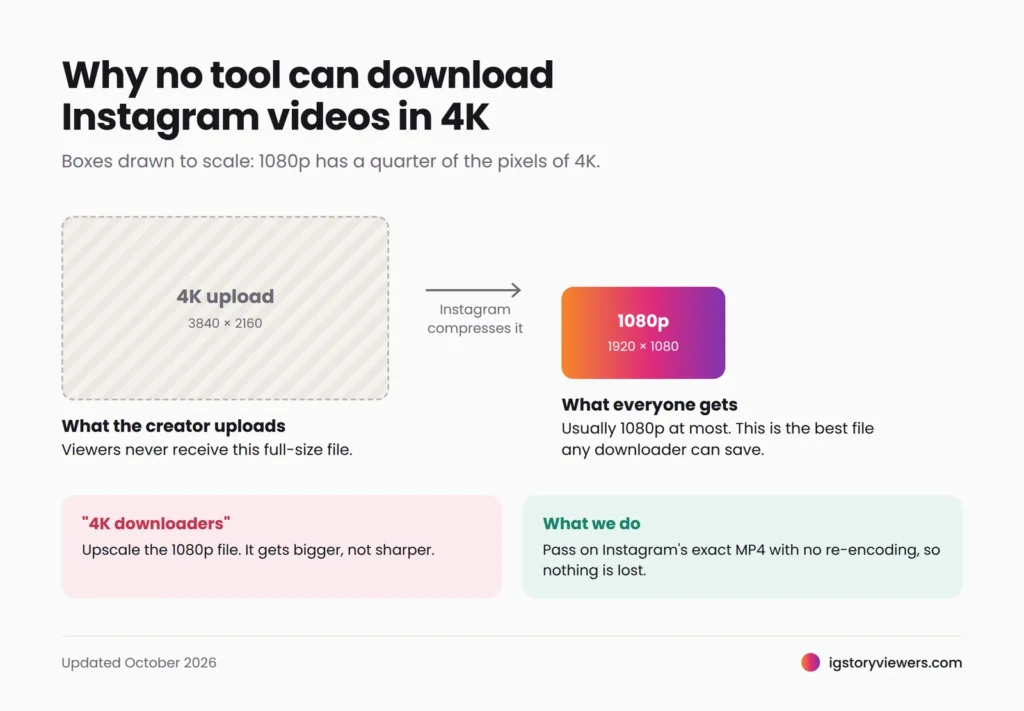
No tool can download an Instagram video in 4K, because Instagram doesn't keep one. When a creator uploads a 4K clip, Instagram compresses it, and the version it serves to viewers is usually 1080p at most. Older or heavily compressed uploads can be lower.
Sites that advertise a "4K Instagram downloader" are either upscaling a 1080p file, which adds size but no detail, or labeling it 4K when it isn't. Our downloader passes on the exact MP4 Instagram serves, without re-encoding, so you get the best quality that exists.
If a video looks soft after downloading, check it in the Instagram app. It almost always looks the same there. For the full explanation, read can you download Instagram videos in 4K?
When an Instagram video won't download
Most failures come from the account's privacy, the creator's settings or an incomplete link.
| Reason | What you can do |
|---|---|
| The account is private | Nothing. Private videos are only sent to approved followers, so no tool can get them |
| The creator turned off downloads | Nothing. We respect that setting |
| The music is blocked for download | Nothing. Some licensed tracks prevent downloads entirely |
| The link is incomplete or has extra text | Copy it again with Share, then Copy link, and paste the full URL |
| The video was deleted or archived | Check it still opens in Instagram |
| Instagram is having an outage | Wait a few minutes and try again |
Be careful with any site that promises to download videos from private accounts. That isn't technically possible without a follower's login, so those sites are usually after your password. Here's what fake private Instagram downloaders really do.
Please use downloads fairly
Every video belongs to the person who made it, and many use licensed music. Saving a clip for offline viewing or reference is one thing. Reposting it as your own, or using it in ads or paid content, needs the creator's permission. If you share something you saved, credit the creator.
FAQ
How can I save an Instagram video to my camera roll?
On iPhone, download it, open it in the Files app, tap Share, then Save Video. On Android, it usually appears in your gallery automatically.
How do I download an Instagram video on PC?
Copy the video's URL from your browser, paste it into our video downloader and click Download MP4. It saves to your Downloads folder.
Will the creator know I downloaded their video?
No. Instagram doesn't notify creators about downloads made through a web downloader.
Does the downloaded video have sound?
Yes. If a video's music is blocked for download, the download fails instead of saving a silent file.
Can I download Instagram videos without an account?
Yes, from public accounts. You only need the video's link.
Can I download Instagram videos in 4K?
No. Instagram doesn't store 4K versions, so the best available is usually 1080p.
Save your first video
Paste a public Instagram video or Reel link into the IG Story Viewers video downloader and save it as MP4. It's free, needs no login, and adds no watermark. Saving stories instead? See how to download Instagram stories.
Keep reading
- Instagram Tips
How to See Your Old Instagram Stories (and Your Watch History)
Instagram saves your expired stories in a private archive. Find them in a minute, fix an empty archive, restore deleted stories and check your Reels watch history.
- Instagram Tips
How to Share an Instagram Post to Your Story (or a DM)
One button handles almost all sharing on Instagram. Here's how to put a post on your story, send it in a DM or copy its link.
- Instagram Tips
Does Instagram Notify When You Screenshot a Story? (2026)
Instagram doesn't tell anyone when you screenshot or screen record a story. Here's where screenshots do matter in DMs, plus every rule in one table.